Self-Aware Trend System
This professional-grade solution for MetaTrader 5 helps traders achieve greater efficiency in their daily workflow. This technical indicator acts as a specialized analysis tool designed to visualize market data. It helps traders identify emerging trends, momentum shifts, and key support or resistance levels by plotting statistical calculations directly onto price charts.
How to Setup and Use Self-Aware Trend System
1. Installation: Place your file in the MQL/Indicators folder via "Open Data Folder" and restart your terminal.
2. Loading: Find the indicator in the Navigator, drag it onto your chart, and configure the input parameters in the popup window.
3. Customization: Press Ctrl+I to open the indicator list, select your tool, and click "Properties" to change colors, levels, or visual styles.
4. Updating: Replace the old file in the Indicators folder with the new version and restart the platform to apply changes.
Frequently Asked Questions
Q: Why is my indicator not showing? A: Verify the file is in the MQL/Indicators folder, or try right-clicking the "Indicators" tree in the Navigator and clicking "Refresh."
Q: Do custom indicators slow down the platform? A: Too many complex indicators can impact performance; remove unused ones via the "Indicator List" (Ctrl+I).
Q: Can I use MT4 indicators on MT5? A: No, MQL4 and MQL5 are distinct languages; ensure the indicator is compiled specifically for your platform version.
Description & Settings
The
Self-Aware Trend System (SATS)
is an advanced multi-engine SuperTrend indicator for MetaTrader 5 that goes far beyond a standard trend-following line. It combines four tightly integrated sub-systems: an
Adaptive SuperTrend engine
, a
Trend Quality Index (TQI)
, a
Signal Scoring filter
, and a built-in
Risk Management layer
with automatic TP/SL projection. The result is a single indicator that not only identifies the trend but also measures how strong and trustworthy that trend is, filters low-quality signals, and draws trade levels directly on the chart.
At the core of the indicator is an ATR-based SuperTrend line whose band width adapts in real time using the
Kaufman Efficiency Ratio (ER)
. When price is trending efficiently (high ER), the bands tighten to stay close to price. When price is choppy (low ER), the bands widen to avoid false flips. This adaptation can be further refined by the
Trend Quality Engine (TQI)
, a composite score built from four weighted sub-components: Efficiency (how directional recent movement is), Volatility Regime (whether current ATR is above or below its long-term baseline), Market Structure (pivot-high and pivot-low alignment), and Momentum Persistence (how consistently price has followed through in the same direction). The TQI score runs from 0 to 1 and is shown live in the on-chart dashboard. A
Character-Flip detection
module watches for a sharp drop in TQI during an active trend, treating that drop as an early warning that the trend character has changed before the SuperTrend line itself flips.
Signals are only displayed when a composite
Signal Score
clears a configurable minimum threshold. This score is built from momentum alignment, Efficiency Ratio level, Volume Z-score, RSI zone, pivot structure, and a baseline bonus. The scoring system prevents the indicator from printing arrows on every SuperTrend flip and focuses attention on setups where multiple conditions agree. Once a valid signal fires, the indicator immediately draws an
Entry line
, a
Stop Loss
(ATR-distance below/above entry), and three
Take Profit levels
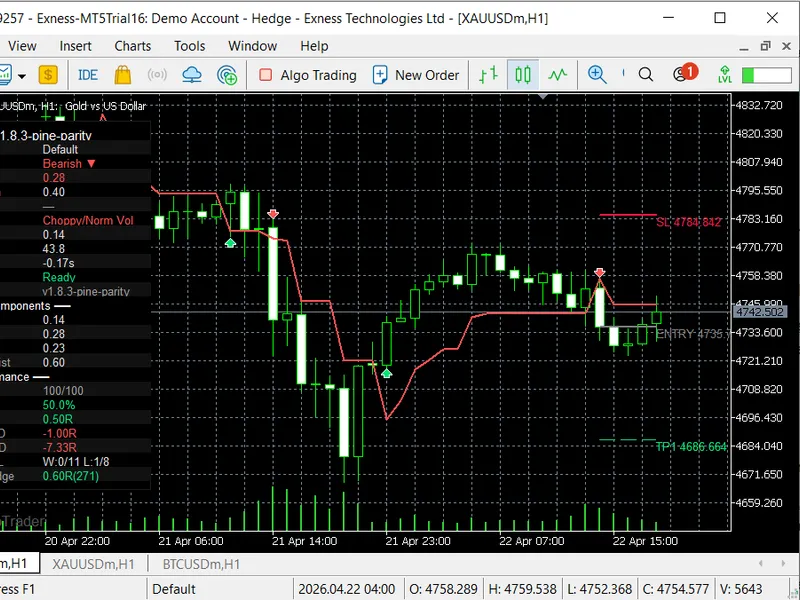
(TP1, TP2, TP3) defined as R-multiples of the initial risk. As subsequent bars form, the TP and SL lines extend forward and are automatically marked when hit.
The
Performance Dashboard
displays all of this in a compact panel that can be anchored to any corner of the chart. It shows the current TQI and its four sub-components, trend direction, active preset name, RSI, Volume Z-score, Efficiency Ratio, rolling win rate, average R, rolling drawdown, all-time win/loss streaks, and cumulative R. An experimental
Auto-Calibration
module monitors recent signal R-results and adjusts the Quality Influence parameter up or down to self-correct when the indicator enters a run of poor signals. The indicator is fully non-repainting: the dashboard and all signals are locked to confirmed closed bars (shift = 1), so no value changes on a chart refresh.
Six built-in
Presets
(Auto, Scalping, Default, Swing, Crypto 24/7, Custom) adjust ATR length, base multiplier, ER window, RSI period, and SL multiplier in a single dropdown. The
Auto
preset selects Scalping for timeframes up to M5, Default for M6 through H4, and Swing for H5 and above. All visual elements (band colors, signal labels, TQI-colored line, background shading, watermark) are individually toggleable. Alerts fire with either a plain-text or a structured
Webhook JSON
payload containing symbol, timeframe, price, SL, TP1-3, score, and TQI, making it straightforward to pipe signals into an external system or trade copier.
Input Parameters