
Round-Number / Psychological Level Magnet
Info
The Round-Number / Psychological Level Magnet is a Indicator for MetaTrader 5 that round-number / psychological level magnetthe idea behind itprice does not require a specific reason to react at levels like 1. 1000, 150.
Usage
This tool is typically used for enhancing chart analysis and decision making.
Platform
This Indicator works exclusively on MetaTrader 5 (both build 600+ and newer versions).
Setup
Place the downloaded file in MQL5/Indicators folder via File ? Open Data Folder in MetaTrader 5.
How to Install and Use Round-Number / Psychological Level Magnet
1. Installation: Place your file in the MQL/Indicators folder via "Open Data Folder" and restart your terminal.
2. Loading: Find the indicator in the Navigator, drag it onto your chart, and configure the input parameters in the popup window.
3. Customization: Press Ctrl+I to open the indicator list, select your tool, and click "Properties" to change colors, levels, or visual styles.
4. Updating: Replace the old file in the Indicators folder with the new version and restart the platform to apply changes.
Frequently Asked Questions
Q: Why is my indicator not showing? A: Verify the file is in the MQL/Indicators folder, or try right-clicking the "Indicators" tree in the Navigator and clicking "Refresh."
Q: Do custom indicators slow down the platform? A: Too many complex indicators can impact performance; remove unused ones via the "Indicator List" (Ctrl+I).
Q: Can I use MT4 indicators on MT5? A: No, MQL4 and MQL5 are distinct languages; ensure the indicator is compiled specifically for your platform version.
What this tool does
Round-Number / Psychological Level MagnetThe idea behind itPrice does not require a specific reason to react at levels like 1.
Typical Use Case
This Indicator excels in automated trading and technical analysis on MetaTrader 5.
Compatible Platform & Setup
This Indicator works on MetaTrader 5. Place the file in the MQL5/Indicators folder and restart the terminal.
Description & Settings
Related: Round Numbers: Automatic Psychological Thresholds - another powerful indicator for MetaTrader 5 traders.
Round-Number / Psychological Level MagnetAlso recommended: Psychological Indicator - similar indicator with strong performance on MetaTrader 5.
The idea behind it
Price does not require a specific reason to react at levels like 1.1000, 150.00, or 1950.00. These round numbers naturally attract orders because a significant number of traders place their stops, take-profits, and resting limit orders around these figures.
The challenge with manually identifying these levels is that the definition of "round" varies across different symbols. For EURUSD, a significant move is 0.0100. For USDJPY, it's 1.00. For XAUUSD, it's approximately 10.00.
Round-Number Magnet intelligently reads the current price's magnitude to automatically determine an appropriate spacing for these key levels. It then displays a concise grid of major and intermediate levels centered on the current price.
Instead of requiring manual adjustment of spacing for each new symbol, the auto-step logic adapts to the instrument's price scale, identifying the "00" style levels that traders commonly reference. Manual override is available if your trading strategy uses a different convention.
How to interpret it
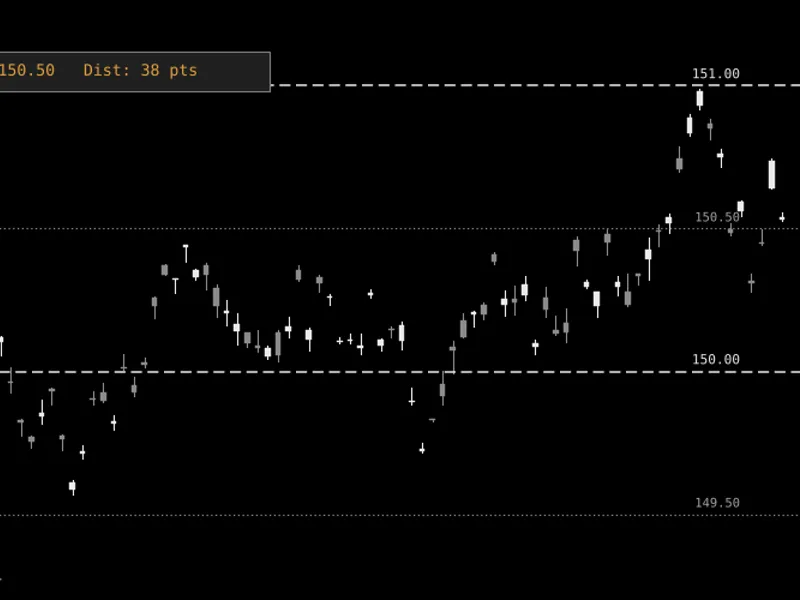
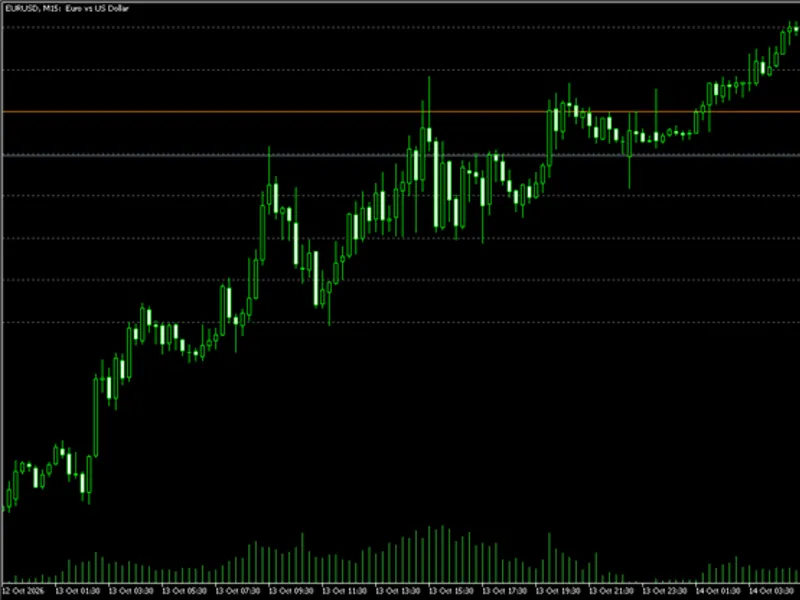
Dashed lines represent major price levels, corresponding to the "00" round numbers at the automatically detected or manually set spacing.
Dotted lines, when enabled, are positioned exactly halfway between major levels, representing the "50" levels that traders often view as minor attractors.
The displayed grid is centered on the current price. It only redraws when the price moves sufficiently far from the current center, preventing unnecessary flickering or high CPU usage, even with volatile price feeds.
The on-chart readout provides the price of the nearest magnet level and the current distance to it in points. This offers a quick way to assess proximity to significant levels without manual chart analysis.
The readout text changes color from silver to orange when the price enters a user-defined approach distance, serving as a visual cue before any alerts are triggered.
When alerts are active, a close approach to any magnet level will trigger a single alert and log the event in the Experts tab. The alert will not repeat for the same approach until the price moves beyond the specified re-arm distance.
External variables (inputs)
Input
Default
Purpose
InpManualStep
0.0
Manual level spacing in price units. Set to 0 to automatically detect spacing based on the current price magnitude.
InpLevelsEachSide
6
The number of major levels displayed above and below the current price.
InpShowHalfLevels
true
Determines whether to display the intermediate levels situated between major levels.
InpRecenterThreshold
0.70
A fractional value (0 to 1) of the half-band width. The price must drift this amount before the grid recenters and redraws.
InpAlertOnApproach
false
Enables a single alert when the price approaches within a specified distance of any magnet level.
InpApproachPoints
50
The distance, in points, considered "near" a magnet level for alert purposes.
InpRearmPoints
100
The distance, in points, the price must move away before the same approach alert can trigger again.
InpCorner
CORNER_LEFT_UPPER
The chart corner where the readout panel is anchored.
InpCornerX
20
The horizontal offset, in pixels, of the panel from the selected corner.
InpCornerY
20
The vertical offset, in pixels, of the panel from the selected corner.
InpBigColor
Silver
The color used for the major (dashed) levels.
InpHalfColor
DimGray
The color used for the intermediate (dotted) levels.
Recommended use
This indicator is compatible with any symbol provided by your broker, including FX, metals, indices, and crypto CFDs, as its spacing is dynamically derived from the price itself rather than being hardcoded.
It is most effective on H1 timeframes and higher, where reactions to round numbers are a consistent pattern. On M1 and M5 charts, the "magnet" effect may be less pronounced compared to typical price fluctuations.
This tool functions purely as a visualization aid. It does not place orders or manage positions, meaning it does not incur any margin or stop-out risk and operates consistently across all account types.
Using a high value for InpLevelsEachSide on a volatile symbol may result in more frequent recentering. If the grid redraws too often, consider adjusting InpRecenterThreshold by increasing its value closer to 1 to reduce sensitivity, or decrease the number of displayed levels.
Distance is measured in points, not pips. For a 5-digit FX symbol, 50 points equate to 5 pips. Adjust InpApproachPoints accordingly based on the specific digit convention of the symbol you are trading.
Figure 1. Round-Number Magnet grid and nearest-magnet readout displayed on a USDJPY chart. (Note: Image displayed in black and white according to Code Base guidelines; actual line colors are configurable on a live chart.)
You may also like: Psychological HTF - excellent alternative for indicator users on MetaTrader 5.
Source Code
#property copyright "RobotFX"
#property link "https://robotfx.org"
#property version   "1.00"
#property description "This code is educational. Feel free to use, modify and upgrade as you wish. Visit ROBOTFX.ORG for professional trading tools"
#property indicator_chart_window
#property indicator_plots 0
input group "Levels";
input double InpManualStep        = 0.0;
input int    InpLevelsEachSide    = 6;
input bool   InpShowHalfLevels    = true;
.......
⚠ Limitations & Risk Warning
- This tool is provided for educational and testing purposes only.
- Past performance does not guarantee future results.
- Trading involves substantial risk of loss. Use on a demo account first.
- Results may vary depending on market conditions, broker, and settings.
- We recommend thorough backtesting and forward testing before using with real funds.