Professional Zig Zag
This tool for MetaTrader 5 is specifically engineered to streamline your trading operations. This technical indicator acts as a specialized analysis tool designed to visualize market data. It helps traders identify emerging trends, momentum shifts, and key support or resistance levels by plotting statistical calculations directly onto price charts.
How to Setup and Use Professional Zig Zag
1. Installation: Place your file in the MQL/Indicators folder via "Open Data Folder" and restart your terminal.
2. Loading: Find the indicator in the Navigator, drag it onto your chart, and configure the input parameters in the popup window.
3. Customization: Press Ctrl+I to open the indicator list, select your tool, and click "Properties" to change colors, levels, or visual styles.
4. Updating: Replace the old file in the Indicators folder with the new version and restart the platform to apply changes.
Frequently Asked Questions
Q: Why is my indicator not showing? A: Verify the file is in the MQL/Indicators folder, or try right-clicking the "Indicators" tree in the Navigator and clicking "Refresh."
Q: Do custom indicators slow down the platform? A: Too many complex indicators can impact performance; remove unused ones via the "Indicator List" (Ctrl+I).
Q: Can I use MT4 indicators on MT5? A: No, MQL4 and MQL5 are distinct languages; ensure the indicator is compiled specifically for your platform version.
Description & Settings
That is it?
I think that ZigZag is something like compression of the price chart. The ZigZag can be calculated using the price of the bar (for example, Close price) or High/Low prices of the bar (the most common used method)
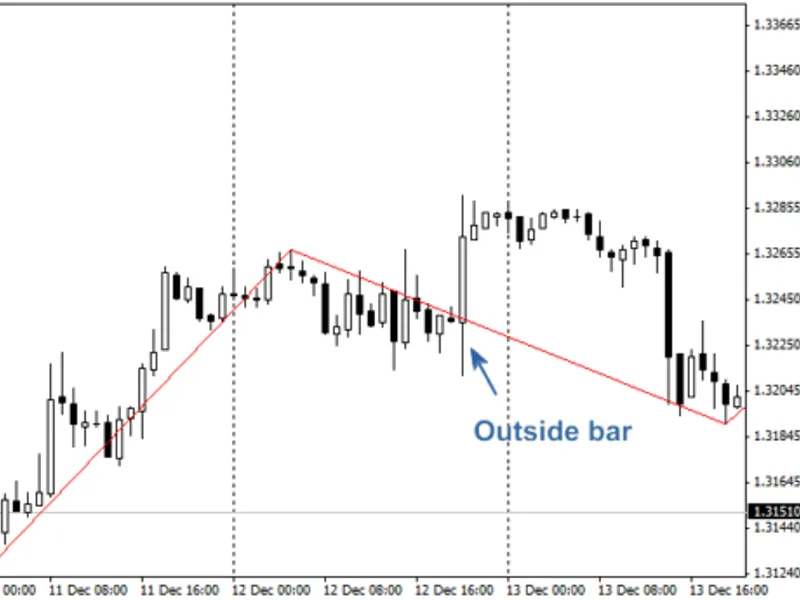
While working with the standard ZigZag, proposed by MetaQuotes, I have found some errors. The main problem is that standard ZigZag doesn't proceed the case of the outside bar.
In 2007
(Rosh)
have published the code with outside bar processing (DRAW_ZIGZAG style instead of DRAW_SECTION).
Let's define the features of the "correct" ZigZag implementation:
The Highs and Lows must be strictly alternated;
The High must be higher (or equal) among the all bars on the right side until the next (opposite) Low;
The Low must be lower (or equal) among the all bars on the left side until the next (opposite) High.
Let's consider using the example (EURUSD, H1, 2006, December 8-13). Here we have two cases with the outside bar. The typical ZigZag cannot constuct the "correct" picture.
Figure 1.
Typical with input parameters [12;5;3] and [12;0;0]
Figure
2.
with input parameters [12;5;3]
Figure
3.
with input parameters [12;0;0]
At first glance, the correct construction is presented at
Figure 3
but here are some features:
In this case it has been constructed correctly because of the input parameters, but generally the algorithm must work with any parameters.
The outside bar on the left side isn't correct, because of the order of High/Low formation of the bar:
The ZigZag segments must be constucted this way.
I have tested many cases of the following ZigZag algorithms:
ZigZag MT3, ZigZag, Zigzag R, Zigzag2 R, ZigZag_NK, ZigZag_ZUP89_nen, ZigZag_new_nen4, CZigZag, Swing_ZZ_1, DT_ZZ_nen, ZigZag_Talex, Reverse_ZZ, Points_ZZ_1, i_MF_Fractal_ZZ_3in1, ang_Amp_ZZ, ZigzagFr_v1, NonLagZigZag_v2, ZZ_FF_v3, ZigZag Ensign, ZigZag tauber, SQZZ Товаровед, ZZ_2L_nen wellx, Channel ZZ, Azzx_larryzz_3_0, RPoint, RPoint-m v2, ZigZagTF.
But none of them has solved the problem correctly.
Here are the figures with this indicator:
Figure 4.
Professional ZigZag with input parameters [12;0]
Figure 5.
Professional ZigZag with input parameters [23;0]
one-pass algorithm
it recalculate and redraw only the last segment (the segment cannot be cancelled except the history update)
it has the optimization algorithm for the calculations inside the bar (it doesn't use the recalculation on the tick, if price has changed inside the 0 (uncompleted) bar or price change is lower than threshold, defined by MinMotion input parameter)
it has two algorithms for ordering of the High/Low formation: using the bar type (fast but not precise) using the data from the lower timeframe (it needs the history, you need to check for its presence and correctness or you need to modify the
OutsideBar
library)
The ProExtra version is not published, because the correctness of the MetaTrader 5 quotes is not checked.
Here are some additional examples of ZigZag incorrect constructions:
Figure 6.
EURUSD, H1, November 29-December 7. (Red line: ZigZag with input parameters [7;0;0]. Blue line: with input parameters [7;0;0].)
Figure 7.
EURUSD, H1, 2010, November 29 - December 7. The correct construction of ZigZag segments.
Conclusion
Because of the channel algorithm (iHighest/iLowest), sometimes it skips the highs.
Please inform me about the bugs and features of this indicator.