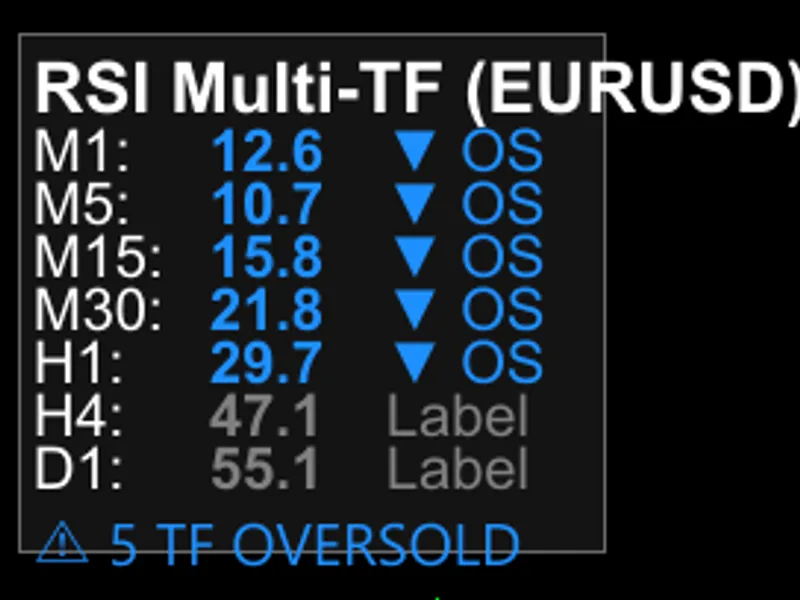
Multi-timeframe RS I scanner with visual dashboard and alerts
This software component for MetaTrader 5 is built to enhance the capabilities of your trading environment. This technical indicator acts as a specialized analysis tool designed to visualize market data. It helps traders identify emerging trends, momentum shifts, and key support or resistance levels by plotting statistical calculations directly onto price charts.
How to Setup and Use Multi-timeframe RS I scanner with visual dashboard and alerts
1. Installation: Place your file in the MQL/Indicators folder via "Open Data Folder" and restart your terminal.
2. Loading: Find the indicator in the Navigator, drag it onto your chart, and configure the input parameters in the popup window.
3. Customization: Press Ctrl+I to open the indicator list, select your tool, and click "Properties" to change colors, levels, or visual styles.
4. Updating: Replace the old file in the Indicators folder with the new version and restart the platform to apply changes.
Frequently Asked Questions
Q: Why is my indicator not showing? A: Verify the file is in the MQL/Indicators folder, or try right-clicking the "Indicators" tree in the Navigator and clicking "Refresh."
Q: Do custom indicators slow down the platform? A: Too many complex indicators can impact performance; remove unused ones via the "Indicator List" (Ctrl+I).
Q: Can I use MT4 indicators on MT5? A: No, MQL4 and MQL5 are distinct languages; ensure the indicator is compiled specifically for your platform version.
Description & Settings
I've been running RSI strategies for over a year now, and single-timeframe RSI kept giving me too many false signals—especially during volatile sessions on Gold and fast-moving pairs. That's when I built this multi-timeframe scanner to catch convergence setups before they fully develop.
The real power comes from the alignment indicator at the bottom—when 3 or more timeframes hit overbought or oversold at the same time, you get a big warning. That's your convergence zone, and in my experience, those are the highest-probability setups for reversals or strong continuations.
FEATURES
7 timeframes monitored
– M1, M5, M15, M30, H1, H4, D1 (toggle each on/off independently)
Visual dashboard
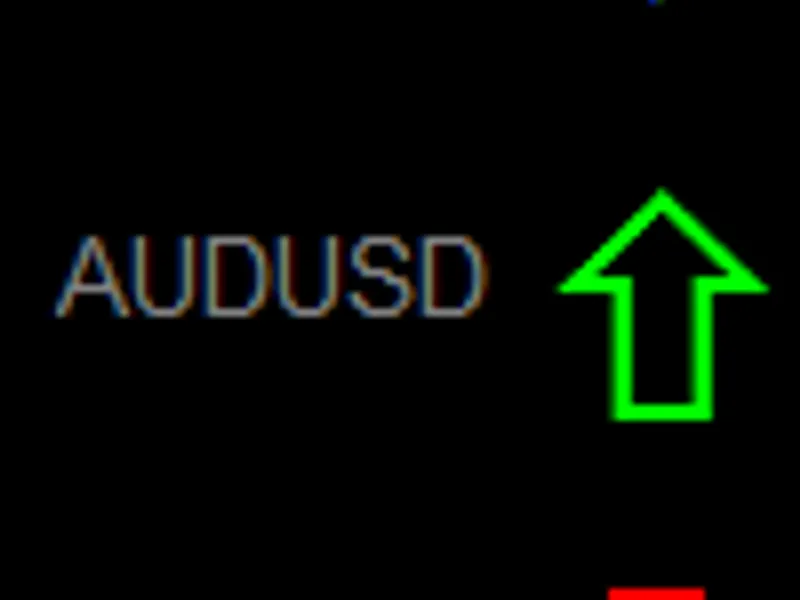
– Real-time RSI values color-coded by state (red = overbought, blue = oversold, gray = neutral)
Convergence warning
– Special indicator highlights when 3+ timeframes align in overbought or oversold (the "money zone")
Fully customizable
– Adjust RSI period (1-500), overbought/oversold levels, colors, dashboard position, font size (6-24 with auto-scaling), update interval (1-60 seconds)
Clean code
– No magic numbers, proper error handling, all dashboard objects hidden from MT5 clutter (OBJPROP_HIDDEN)
Verbose logging toggle
– Enable/disable detailed debug logs without recompiling (perfect for VPS or live trading) HOW TO USE
1. Attach to any chart
– Works on all symbols. I use it mainly on XAUUSD (Gold) and EURUSD for scalping, but it's equally good on indices (US30, NAS100) or crypto (BTCUSD).
2. Select your timeframes
– Toggle which timeframes you want to monitor in the inputs. For day trading, I usually run M15, M30, H1, H4. For swing trading, try H1, H4, D1, W1.
4. Watch for convergence
– When the bottom warning shows "⚠ 3+ TF OVERBOUGHT" or "⚠ 3+ TF OVERSOLD", that's your cue. Don't blindly counter-trend—confirm with price action first (pin bar, engulfing, rejection wick, etc.).
5. Optional: Enable verbose logging
– If you're debugging or testing new settings, enable Verbose_Logging in the inputs. This logs detailed info about retry attempts, position adjustments, etc. Turn it off for production to keep logs clean.
INPUT PARAMETERS RSI Settings:
RSI_Period
(default: 14) – Standard RSI calculation period (1-500 range)
Overbought_Level
(default: 70) – Threshold for overbought alerts (50-100)
Oversold_Level
(default: 30) – Threshold for oversold alerts (0-50) Timeframe Selection:
Toggle each timeframe on/off:
Show_M1
,
Show_M5
,
Show_M15
,
Show_M30
,
Show_H1
,
Show_H4
,
Show_D1
Pro tip: Don't enable all 7 unless you really need it. I find 4-5 timeframes (M15, M30, H1, H4, D1) is the sweet spot for most strategies. Alert Settings:
Enable_Push_Alerts
– Send push notifications to your mobile MT5 terminal
Enable_Sound_Alerts
– Play sound when alerts trigger (default: alert2.wav)
Alert_Sound
– Sound file name (must be in terminal Sounds folder) Display Settings:
Dashboard_X / Dashboard_Y
– Position on chart in pixels (v1.5+ auto-adjusts if off-screen)
Dashboard_Width
– Width of the dashboard (150-500 pixels, default: 200)
Color_Overbought / Color_Oversold / Color_Neutral
– Customize colors to match your chart theme
Color_Background
– Dashboard background (default: dark gray C'20,20,20')
Font_Size
– Text size 6-24 (UI auto-scales proportionally, I use 10-12)
Update_Seconds
– How often to refresh data (1-60 seconds, default: 1) Advanced Settings (v1.6):
Verbose_Logging
(default: false) – Enable detailed debug logs. Turn on for troubleshooting, off for production/VPS. Logs retry attempts, position adjustments, data loading status, etc.
Alert_Retry_Enabled
(default: true) – Automatically retry failed alerts up to 2 times with 100ms delay. Prevents missed notifications due to temporary connection issues or terminal being busy. BEST PRACTICES
From my testing on live accounts over the last 4+ months:
Use during active sessions
– Works best during London and NY sessions. Asian session tends to be too choppy for RSI convergence to be meaningful.
Don't wait for ALL timeframes to align
– If you wait for all 7 to hit extreme levels, you'll get maybe 1 signal per week. The 3+ convergence warning is the sweet spot between quality and frequency.
Combine with price action
– The indicator tells you WHEN RSI is aligned, but you still need to confirm with a good entry setup (rejection wick, break of structure, engulfing candle, etc.)
Adjust thresholds for your pair
– On faster pairs like GBPJPY or volatile indices, I sometimes use 75/25 instead of 70/30. Gold works fine with default 70/30. Test what fits your style.
Watch H4 RSI as a "veto"
– If H4 is showing strong trend (RSI > 60 or < 40), be careful taking counter-trend entries based on M15/M30 signals. You're probably catching a knife.
Use convergence for confirmation, not initiation
– I don't blindly short when I see "3 TF OVERBOUGHT." I wait for price to show weakness first (break of structure, rejection, etc.), THEN I use the convergence as extra confidence.
Enable alert retry on VPS
– If you're running on VPS with spotty connection or high latency, keep Alert_Retry_Enabled = true. It saved me from missing 2 major XAUUSD setups in January when my VPS had network hiccups.
Turn off verbose logging in production
– Verbose_Logging is great for debugging, but on VPS with limited disk space, keep it off to avoid bloated log files. TECHNICAL NOTES
This is v1.6 with production-ready improvements:
Verbose logging control (NEW in v1.6)
– Verbose_Logging input parameter gates all debug Print() statements. Keeps logs clean in production, enables detailed troubleshooting when needed.
All constants extracted
– LINE_HEIGHT_PADDING = 8, DEFAULT_DASH_X = 20, DEFAULT_DASH_Y = 50, ALERT_MAX_RETRIES = 2, ALERT_RETRY_DELAY_MS = 100. Makes the code self-documenting and easier to tweak.
Robust dashboard positioning
– Validates chart dimensions and auto-adjusts if you accidentally set it off-screen. Uses DEFAULT_DASH_X/Y constants instead of hardcoded fallback values.
OBJPROP_HIDDEN on all objects
– Dashboard elements don't clutter your MT5 object list (v1.5+)
Throttled error warnings
– iTime warnings only fire once per minute per timeframe instead of spamming logs
Proper handle cleanup
– ReleaseAllHandles() called on OnDeinit and before re-init to prevent memory leaks (fixed in v1.5)
Cached tfCount
– Avoids repeated ArraySize() calls in hot path (minor perf improvement)
BarsCalculated() check
– Waits for indicator to finish calculating before trying to read data (prevents errors during chart load)
Graceful data handling
– Shows "..." instead of crashing when data isn't ready yet
I've been running this on 2 live accounts since October 2025 (currently on v1.6 since early Feb 2026) without crashes or memory issues. Tested extensively on XAUUSD, EURUSD, GBPUSD, US30, NAS100, and BTCUSD.
INSTALLATION
Copy
RSI_MultiTF_Alert_v1.6.mq5
to your
MQL5/Indicators
folder
Compile in MetaEditor (
Ctrl+F7
) – should compile clean with 0 errors, 0 warnings
Restart MT5 or refresh Navigator (
Ctrl+N
)
Drag indicator onto any chart
If you want mobile push alerts, make sure notifications are enabled in MT5 mobile app settings (Tools > Options > Notifications)
Source code fully included. Feel free to modify—code is clean, well-commented, and all constants are extracted.
SCREENSHOTS
(Recommended screenshots to attach - 750x500 pixels, black/white color scheme for printability):
Dashboard during normal market
– Shows panel with RSI values on multiple TFs, some red, some blue, some gray
Convergence warning active
– When 3+ timeframes hit overbought or oversold (this is the money shot) ⭐
Mobile push alert
– Screenshot of phone showing "XAUUSD M15 RSI OVERBOUGHT: 72.3" notification
Alert retry in logs
– Terminal Experts tab showing retry attempts (if Verbose_Logging enabled) REQUIREMENTS
MetaTrader 5
(Build 3800+, tested up to Build 4200)
Any trading symbol
– Forex, indices, crypto, metals all work
Recommended:
VPS or stable internet connection for reliable alert delivery (retry helps, but can't fix complete outages) VERSION HISTORY
v1.6
(2026.02.11) –
Production ready:
Alert retry system, verbose logging control, all constants extracted, robust error handling
v1.5
(2026.01.25) – Robust dashboard positioning, OBJPROP_HIDDEN, magic numbers → constants, throttled warnings, handle cleanup fixes
v1.4
(2026.01.20) – Cached tfCount, improved data validation logic
v1.3
(2025.12.15) – Proportional UI scaling, no static vars in functions
v1.2
(2025.11.20) – Added alignment indicator, improved error handling
v1.1
(2025.11.05) – Added customizable colors and dashboard sizing
v1.0
(2025.10.28) – Initial release KNOWN LIMITATIONS
Being honest about what this
doesn't
do:
Not a trading system
– This is a scanner/alert tool. It doesn't tell you where to enter or exit. You still need a strategy and price action confirmation.
Alert retry has limits
– The retry system helps with temporary glitches (busy terminal, brief network hiccup), but if your VPS is completely offline or MT5 crashes, you won't get the alert. It's not magic.
Won't work on very slow internet
– If your connection is spotty, you might miss real-time updates. The indicator itself is fine, but RSI needs fresh price data.
No divergence detection
– I've thought about adding RSI divergence across timeframes (price makes new low but RSI doesn't), but haven't built it yet. Maybe v1.7. For now, it's pure convergence-based.
Alerts don't repeat
– Once per bar per timeframe. If you miss the alert and don't check the dashboard, you won't get spammed. But you also won't get reminded. Visual check is your backup. SUPPORT & FEEDBACK
GitHub:
(full source + other projects)
MQL5.com:
WhiteChocolate (DM me if you find bugs or have feature requests)
If this indicator helps your trading, drop a comment or rating. Always curious to hear how others use it—some traders use it for scalping entries, others for swing trade confirmation, others just for confluence with their existing strategy. All valid.
And if you fork the code to add your own features (divergence, trend filters, session-specific alerts, whatever), let me know. I'm always looking for ideas to steal. 😊
Pro tip:
If you're using this on a VPS and want to monitor multiple pairs, just open multiple charts and attach the indicator to each. I run it on XAUUSD M15, EURUSD H1, and US30 M30 simultaneously. Works great with the retry system ensuring I don't miss alerts even when the VPS is under load.