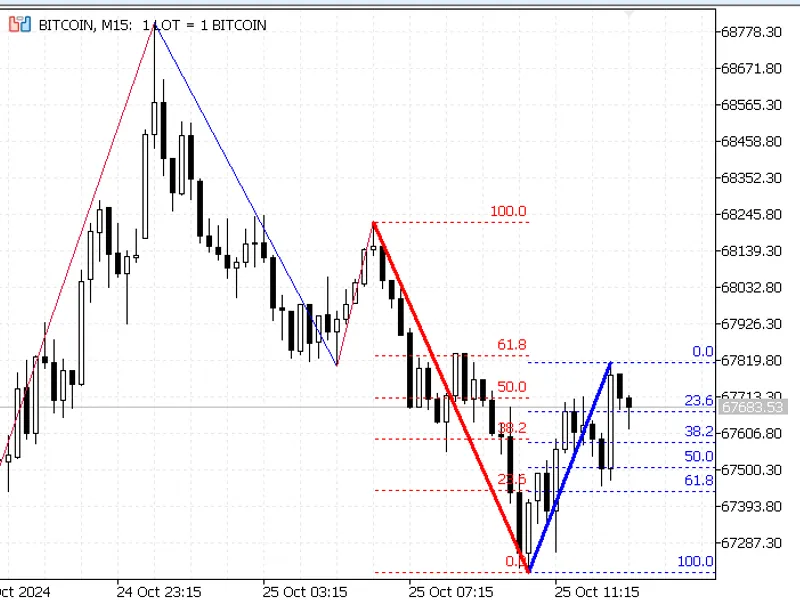
Auto Fibo indicator of two last swings based on Zig Zag
This tool for MetaTrader 5 is specifically engineered to streamline your trading operations. This technical indicator acts as a specialized analysis tool designed to visualize market data. It helps traders identify emerging trends, momentum shifts, and key support or resistance levels by plotting statistical calculations directly onto price charts.
How to Setup and Use Auto Fibo indicator of two last swings based on Zig Zag
1. Installation: Place your file in the MQL/Indicators folder via "Open Data Folder" and restart your terminal.
2. Loading: Find the indicator in the Navigator, drag it onto your chart, and configure the input parameters in the popup window.
3. Customization: Press Ctrl+I to open the indicator list, select your tool, and click "Properties" to change colors, levels, or visual styles.
4. Updating: Replace the old file in the Indicators folder with the new version and restart the platform to apply changes.
Frequently Asked Questions
Q: Why is my indicator not showing? A: Verify the file is in the MQL/Indicators folder, or try right-clicking the "Indicators" tree in the Navigator and clicking "Refresh."
Q: Do custom indicators slow down the platform? A: Too many complex indicators can impact performance; remove unused ones via the "Indicator List" (Ctrl+I).
Q: Can I use MT4 indicators on MT5? A: No, MQL4 and MQL5 are distinct languages; ensure the indicator is compiled specifically for your platform version.
Description & Settings
Features:
Automatic Fibonacci Levels
: The indicator dynamically draws Fibonacci retracement lines based on recent ZigZag highs and lows, giving a clear view of potential reversal points.
Dynamic and Static Fibonacci Options
: Users can choose between dynamic and static Fibonacci retracement levels. The dynamic levels update continuously based on the latest ZigZag points, while the static levels remain fixed to the prior significant high or low.
Customizable Appearance
: You can adjust the color, style, and width of Fibonacci lines for both dynamic and static levels, allowing for personalized visualization to suit different chart backgrounds and styles.
Optimized for MetaTrader 5
: The indicator takes full advantage of MT5's graphical object handling, offering a seamless and efficient charting experience.
Parameters:
ZigZag Settings
( ExtDepth , ExtDeviation , ExtBackstep ): Adjust the sensitivity of the ZigZag pattern to capture more or fewer price swings.
Dynamic Fibonacci Settings
: Customize the color, line style, and width of the dynamic Fibonacci retracement lines.
Static Fibonacci Settings
: Customize the appearance of the static Fibonacci lines based on the second most recent ZigZag high/low.
How to Use:
The AutoFibo indicator is ideal for trend-following and reversal trading strategies. By overlaying Fibonacci levels onto the ZigZag pattern, it allows traders to visually assess retracement levels and potential entry/exit points. This indicator can be used on various timeframes, making it versatile for both intraday and long-term trading.