
Iron Hawk SMC Trade Zones M5: Advanced Market Structure Indicator
Info
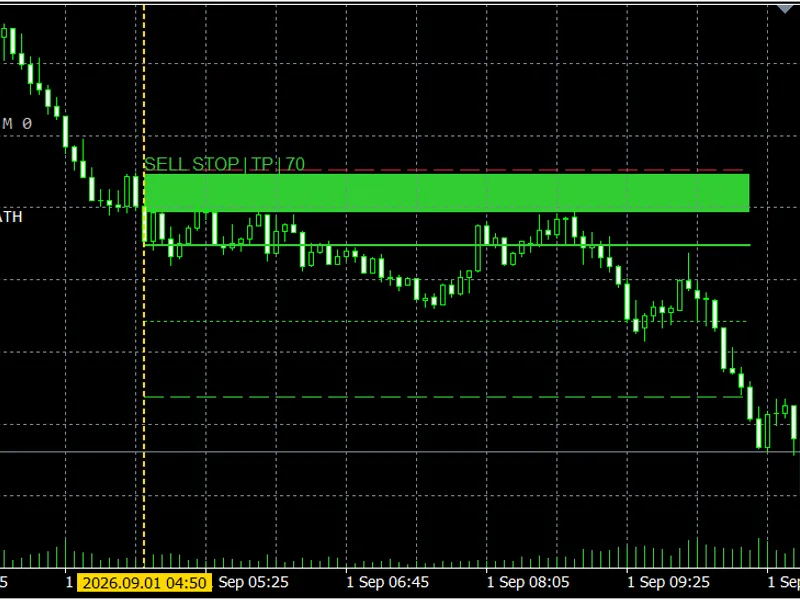
The Iron Hawk SMC Trade Zones M5: Advanced Market Structure Indicator is a Indicator for MetaTrader 5 that iron hawk smc trade zones m5 is a sophisticated chart indicator designed to precisely identify trading opportunities based on m5 closed candles. This indicator integrates several key market analysis elements: confirmed swing points, liquidity sweeps, Break of Structure (BOS) and Change of Character (CHoCH) events, displacement, Fair Value Gaps, Order Blocks, and risk measurements derived from RSI, MACD, and ATR.
Usage
This tool is typically used for enhancing chart analysis and decision making.
Platform
This Indicator works exclusively on MetaTrader 5 (both build 600+ and newer versions).
Setup
Place the downloaded file in MQL5/Indicators folder via File ? Open Data Folder in MetaTrader 5.
How to Install and Use Iron Hawk SMC Trade Zones M5: Advanced Market Structure Indicator
1. Installation: Place your file in the MQL/Indicators folder via "Open Data Folder" and restart your terminal.
2. Loading: Find the indicator in the Navigator, drag it onto your chart, and configure the input parameters in the popup window.
3. Customization: Press Ctrl+I to open the indicator list, select your tool, and click "Properties" to change colors, levels, or visual styles.
4. Updating: Replace the old file in the Indicators folder with the new version and restart the platform to apply changes.
Frequently Asked Questions
Q: Why is my indicator not showing? A: Verify the file is in the MQL/Indicators folder, or try right-clicking the "Indicators" tree in the Navigator and clicking "Refresh."
Q: Do custom indicators slow down the platform? A: Too many complex indicators can impact performance; remove unused ones via the "Indicator List" (Ctrl+I).
Q: Can I use MT4 indicators on MT5? A: No, MQL4 and MQL5 are distinct languages; ensure the indicator is compiled specifically for your platform version.
What this tool does
Iron Hawk SMC Trade Zones M5 is a sophisticated chart indicator designed to precisely identify trading opportunities based on M5 closed candles.
Typical Use Case
This Indicator excels in automated trading and technical analysis on MetaTrader 5.
Compatible Platform & Setup
This Indicator works on MetaTrader 5. Place the file in the MQL5/Indicators folder and restart the terminal.
Description & Settings
Related: Iron Hawk Fibonacci Structure Map for MT4/MT5 - another powerful indicator for MetaTrader 5 traders.
Iron Hawk SMC Trade Zones M5 is a sophisticated chart indicator designed to precisely identify trading opportunities based on M5 closed candles.Also recommended: Tirone Levels: Support and Resistance Indicator - similar indicator with strong performance on MetaTrader 5.
This indicator integrates several key market analysis elements: confirmed swing points, liquidity sweeps, Break of Structure (BOS) and Change of Character (CHoCH) events, displacement, Fair Value Gaps, Order Blocks, and risk measurements derived from RSI, MACD, and ATR.
The indicator itself does not execute trades. Instead, it visually presents proposed levels for Entry, Stop Loss, Take Profit 1 (TP1), and Take Profit 2 (TP2) to aid in manual analysis and decision-making.
Key Features
- Calculations are performed on closed bars and do not repaint.
- Detects both bullish and bearish market structures.
- Identifies paths for liquidity sweeps, trend continuation, and momentum reversals.
- Automatically selects between STOP and LIMIT entry proposals.
- Calculates Stop Loss and target levels based on ATR.
- Visualizes TP1 and TP2 levels.
- Displays market regime and structural bias.
- Setup states include: ARMED, ACTIVE, TP, SL, EXPIRED, INVALIDATED, and AMBIGUOUS.
- Shows the five most recent completed setups with outcome-indicating colors.
- Allows navigation to the original signal candle by clicking on the setup history.
- Offers optional terminal, push, and email alerts.
- Provides an optional CSV audit journal.
Retail-Frequency Mode
Organic SMC setups always receive priority. If fewer than two trading opportunities occur within a full broker day, the indicator can incorporate scheduled retail signals after 09:00 and 14:00 server time.
These supplementary signals are generated using a closed-bar majority vote from EMA 20/50, MACD, and RSI. They are distinctly marked as retail fallback setups and utilize configurable ATR-based risk parameters.
The daily count indicates displayed opportunities and does not guarantee a triggered entry or a profitable setup.
Important Settings
- HistoryBars: Determines the amount of M5 history to scan.
- MinimumDailySignals: Sets the daily retail-frequency objective.
- RetailFirstSignalHour and RetailSecondSignalHour: Use broker server time for fallback signal initiation.
- RetailStopATR: Configures the fallback Stop Loss distance.
- RetailTargetR: Sets the proposed TP2 risk multiple.
- MaximumDisplayedSetups: Controls the number of zones displayed on the chart.
- RecentSetupCount: Determines the number of completed setups listed in the history.
- Alert and CSV options can be enabled or configured within the indicator's input parameters.
This indicator should be applied to an M5 chart. Thorough testing on a demo account is recommended before employing its signals in live trading.
We welcome community feedback, particularly regarding the potential integration of native MQL5 Economic Calendar warnings and news filters in a future release planned for 2026.
You may also like: Tirone Levels: Support and Resistance Analysis - excellent alternative for indicator users on MetaTrader 5.
Source Code
#property copyright "RobotFX"
#property link "https://robotfx.org"
#property version   "2.04"
#property strict
#property indicator_chart_window
#property indicator_buffers 0
#property indicator_plots 0
enum IH_SETUP_STATE
{
   IH_DETECTED = 0,
.......
⚠ Limitations & Risk Warning
- This tool is provided for educational and testing purposes only.
- Past performance does not guarantee future results.
- Trading involves substantial risk of loss. Use on a demo account first.
- Results may vary depending on market conditions, broker, and settings.
- We recommend thorough backtesting and forward testing before using with real funds.