






glitch index
Info
The glitch index is a Indicator for MetaTrader 5 that source of this on is february 2004, active trader magazine. system concept this system was inspired by the more successful stock systems that have appeared in the trading system lab.
Usage
This tool is typically used for enhancing chart analysis and decision making.
Platform
This Indicator works exclusively on MetaTrader 5 (both build 600+ and newer versions).
Setup
Place the downloaded file in MQL5/Indicators folder via File ? Open Data Folder in MetaTrader 5.
How to Install and Use glitch index
1. Installation: Place your file in the MQL/Indicators folder via "Open Data Folder" and restart your terminal.
2. Loading: Find the indicator in the Navigator, drag it onto your chart, and configure the input parameters in the popup window.
3. Customization: Press Ctrl+I to open the indicator list, select your tool, and click "Properties" to change colors, levels, or visual styles.
4. Updating: Replace the old file in the Indicators folder with the new version and restart the platform to apply changes.
Frequently Asked Questions
Q: Why is my indicator not showing? A: Verify the file is in the MQL/Indicators folder, or try right-clicking the "Indicators" tree in the Navigator and clicking "Refresh."
Q: Do custom indicators slow down the platform? A: Too many complex indicators can impact performance; remove unused ones via the "Indicator List" (Ctrl+I).
Q: Can I use MT4 indicators on MT5? A: No, MQL4 and MQL5 are distinct languages; ensure the indicator is compiled specifically for your platform version.
What this tool does
source of this on is february 2004, active trader magazine.
Typical Use Case
This Indicator excels in automated trading and technical analysis on MetaTrader 5.
Compatible Platform & Setup
This Indicator works on MetaTrader 5. Place the file in the MQL5/Indicators folder and restart the terminal.
Description & Settings
Related: multi-timeframe relative strength index (mtf rsi) indicator for mt4/mt5 - another powerful indicator for MetaTrader 5 traders.
Also recommended: institutional fractal dimension index (regime detector) - similar indicator with strong performance on MetaTrader 5.
source of this on is february 2004, active trader magazine.system concept
this system was inspired by the more successful stock systems that have appeared in the trading system lab. these strategies share a common timing technique - they attempt to take advantage of minor extreme price movements.
this system detects when price has deviated significantly from its norm by measuring how far it moves above and below a "detrended" simple moving average (sma). the resulting indicator is called the "glitch index," which represents the percentage move price has made above or below the detrended sma. the theory is price will move back to its norm, and we can profit by taking advantage of the temporary deviation.
the formula for calculating the glitch index is:
glitch index = (diff/closing price) * 100
where:
sma = 30-period simple moving average diff = closing price - smamult rocsma = rate of change(sma) * 0.1 + 1 smamult = sma* rocsma
the system buys when the glitch index goes below -2 and sells when it swings back up above +2. however, the system will not enter a long trade if the highest glitch index value within a 30-bar period is greater than 5. this prevents the system from entering when prices snap back from an extremely overbought level, such as a blow-off at the top of a strong bull rally.
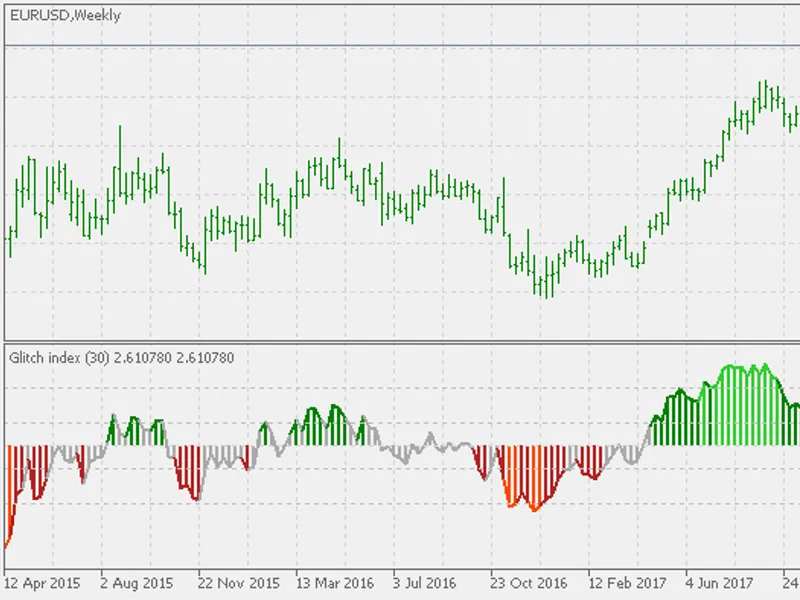
the color of the glitch index (gi) indicator bars helps illustrate what the system is doing.
light green bars indicate a gi greater than 5, which means long trades are forbidden for the next 30 bars even if an entry signal occurs.
dark green bars indicate a gi of greater than 2 (the sell zone).
red bars indicate areas that are within the "no sell" zone (gi < -5).
dark red bars indicate the buy zone (i.e., gi < -2).
the system does not sell short.
entry
the glitch index must be less than -2.
the highest glitch index reading within the last 30 bars must be less than +5.
if these two conditions are met, buy the next bar at the market. exit
if the glitch index is greater than +2, exit next bar at the market. money management
each trade was sized to equal 6 percent of the current account equity.
ps: the system is designed for daily and weekly time frames. for lower time frames the levels have to be adjusted.
You may also like: relative strength index of volatility - excellent alternative for indicator users on MetaTrader 5.
Source Code
/.......
⚠ Limitations & Risk Warning
- This tool is provided for educational and testing purposes only.
- Past performance does not guarantee future results.
- Trading involves substantial risk of loss. Use on a demo account first.
- Results may vary depending on market conditions, broker, and settings.
- We recommend thorough backtesting and forward testing before using with real funds.