Exp Pin Bar - Expert Advisor for Pin Bar Price Action patterns
This tool for MetaTrader 5 is specifically engineered to streamline your trading operations. This Expert Advisor serves as automated trading software. It is utilized to monitor financial markets and execute trades based on predefined algorithmic rules, enabling precise position management without the need for constant manual oversight.
How to Setup and Use Exp Pin Bar - Expert Advisor for Pin Bar Price Action patterns
1. Installation: Open the "File" menu, select "Open Data Folder," navigate to MQL/Experts, paste your file, and restart the terminal.
2. Activation: Drag the EA from the Navigator onto a chart, ensure "Allow live trading" is checked in the Common tab, and verify the AutoTrading button is green.
3. Optimization: Right-click your chart, choose "Expert List," click "Properties" to adjust inputs, and save your preferred setup as a set file for future use.
4. Maintenance: Regularly check the "Experts" tab in the terminal window to monitor trade logs and potential execution errors.
Frequently Asked Questions
Q: Why is my EA not opening trades? A: Check the "AutoTrading" button, ensure "Allow live trading" is enabled, and verify your broker allows automated trading on your account type.
Q: Can I run multiple EAs on one chart? A: No, each chart can only host one active EA; however, you can open multiple charts for different currency pairs to run several EAs.
Q: What does the "smiley face" icon mean? A: A smiley face in the top-right corner of the chart indicates the EA is successfully running; a frowny face means it is disabled.
Description & Settings
ExpPinBar Expert Advisor implements a trading strategy based on the . Positions are opened based on signals from the indicator. To manage open positions, an extended trailing functionality provided by the is available: classic, by Parabolic SAR indicator, moving averages AMA, DEMA, FRAMA, MA, TEMA, VIDYA, as well as by the levels of High and Low candlestick shadows.
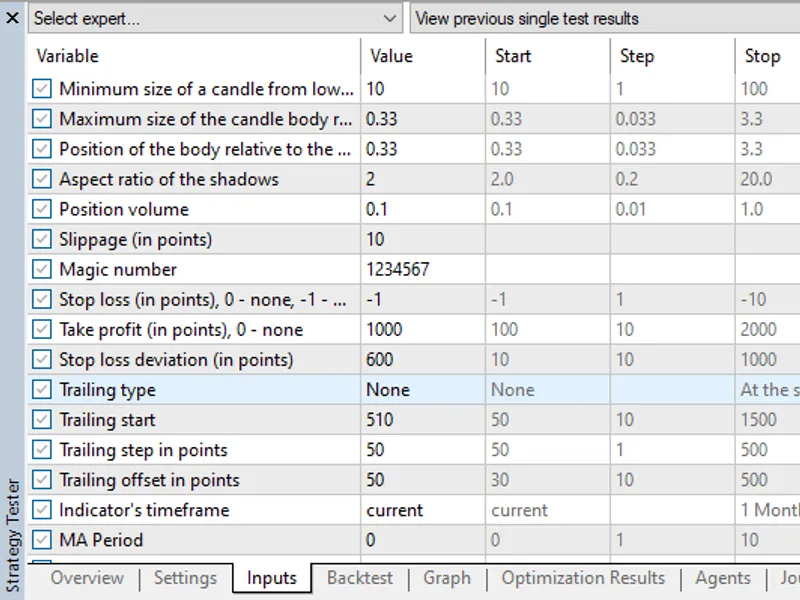
Settings for the pin-bar indicator:
Minimum size of a candle from low to high
- Minimum size of
a candle
(in pips). Sets the minimum allowed height of a candle being analysed (the difference between High and Low). Candles of smaller size are ignored by the indicator, which allows excluding insignificant or "noise" candles. Increase the value to filter weak signals on low-volatility markets;
Maximum size of the candle body relative to its shadows
- Maximum size of the candle body (relative to the size of the whole candle, from 0 to 1). Defines the maximum allowable size of the candle body (difference between Open and Close) relative to the full height of the candle. The smaller the value, the more pronounced will be the signals with long shadows and a small body - classic Pin Bars. To find the most "clean" Pin Bars, use values 0.2 - 0.4;
Position of the body relative to the previous
candle (from 0 to 1). The parameter defines how deep the Pin Bar body can go into the range of the previous candle. The smaller the value, the closer the body will be to the edge of the range, which corresponds to classic reversal patterns. Use values 0.2-0.4 to search for signals where the Pin Bar body is located near the border of the previous candle;
Aspect ratio of the shadows
(coefficient) Sets the minimum ratio between the length of the main shadow (upper for Pin Bar for Sell, lower for Pin Bar for Buy) and the opposite shadow. The higher the value, the more pronounced should be the main shadow compared to the opposite shadow. Values 1.5 - 2.5 allow filtering signals, leaving only candles with a pronounced long shadow.
Advisor settings:
Position volume
- Position volume;
Slippage (in points)
- maximum allowable price deviation during execution, set in points;
Magic number
-
magic number
;
Stop loss (in points), 0 - none, -1 - by PinBar shadow
- Stop loss (in points), 0 - none, -1 - by PinBar shadow price;
Take profit (
in points), 0
- none - Take profit (in points), 0 - none;
Stop loss deviation (in points)
- Stop loss
deviation
from the Pin Bar shadow in points.
Trails settings:
Trailing type
- Trailing type
Trailing
start
- Profit in points for trailing start
Trailing
step in points
- Trailing step in points of price
Trailing offset in points - Trailing offset from price in points
Settings of indicators used in trails:
Indicator's timeframe
- Timeframe of the indicator used in trawl calculation.
MA
Period - Moving Average Calculation Period
MA Shift
- Horizontal shift of the moving average.
AMA Fast
EMA Period - Period of calculation of fast EMA adaptive moving average.
AMA Slow
EMA Period - Period of calculation of slow EMA of adaptive moving average
VIDYA CMO
Period - CMO period of moving average with dynamic averaging period.
Parabolic
SAR Step
- Parabolic SAR Step
Parabolic SAR
Max
- Maximum of Parabolic SAR
MA Applied Price
- Price for moving average calculation
MA Smoothing Method
- Type of moving average smoothing.
Indicator data index
- Bar of data received from the indicator
The and the are required for the Expert Advisor to work.
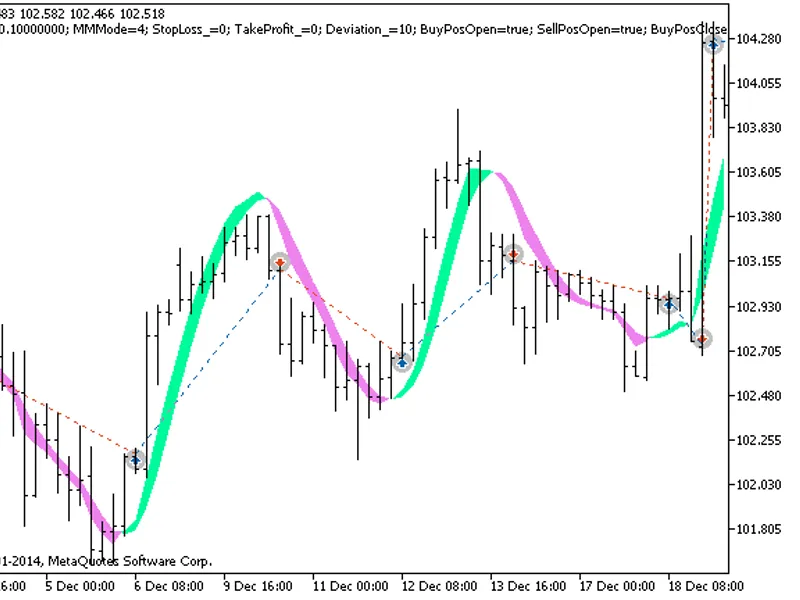
An example of the work of the Expert Advisor for the last year on EURUSD H4 with fixed stop levels and using a simple trawl: