Donchian Channels
This professional-grade solution for MetaTrader 5 helps traders achieve greater efficiency in their daily workflow. This technical indicator acts as a specialized analysis tool designed to visualize market data. It helps traders identify emerging trends, momentum shifts, and key support or resistance levels by plotting statistical calculations directly onto price charts.
How to Setup and Use Donchian Channels
1. Installation: Place your file in the MQL/Indicators folder via "Open Data Folder" and restart your terminal.
2. Loading: Find the indicator in the Navigator, drag it onto your chart, and configure the input parameters in the popup window.
3. Customization: Press Ctrl+I to open the indicator list, select your tool, and click "Properties" to change colors, levels, or visual styles.
4. Updating: Replace the old file in the Indicators folder with the new version and restart the platform to apply changes.
Frequently Asked Questions
Q: Why is my indicator not showing? A: Verify the file is in the MQL/Indicators folder, or try right-clicking the "Indicators" tree in the Navigator and clicking "Refresh."
Q: Do custom indicators slow down the platform? A: Too many complex indicators can impact performance; remove unused ones via the "Indicator List" (Ctrl+I).
Q: Can I use MT4 indicators on MT5? A: No, MQL4 and MQL5 are distinct languages; ensure the indicator is compiled specifically for your platform version.
Description & Settings
Richard Donchian
Richard Donchian is a legendary figure in trading. He is often called a founder of the trend following systems. The famous Turtle trading system is based on his works. Donchian came to a serious success when he was in quite an old age already. Despite that, he continued working and proved to be a successful trader showing by his own example that no one is too old for trading.
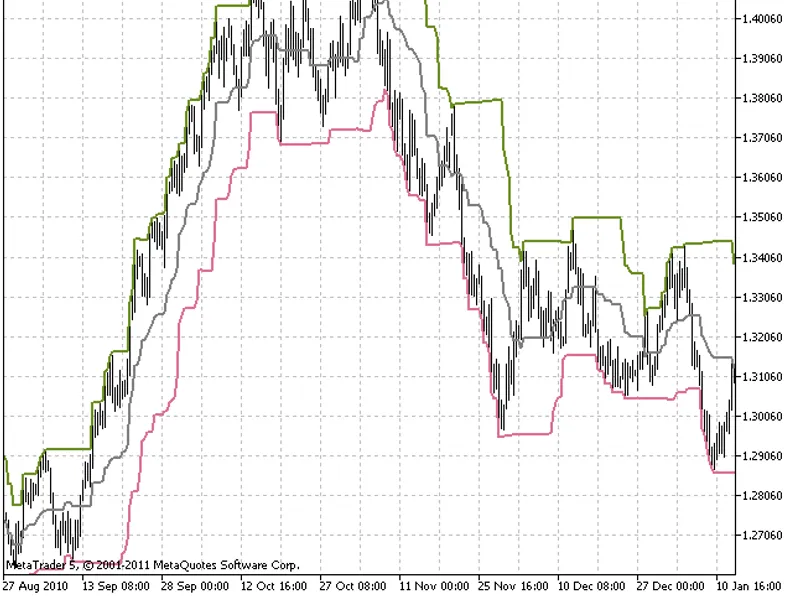
Donchian Channels is a volatility indicator based on the calculation of the current price range with the help of the recent highest and lowest prices. All that is needed to calculate the Channel is to find the highest maximum and the lowest minimum for a definite period.
Richard Donchian himself recommended to use period 20 to build the Channel. In those days trading was usually conducted on day charts and 20 is exactly an average number of days in a month. Nevertheless, period 20 is also quite convenient for creation of Donchian Channels on lesser timeframes. Results of building the Channels with the periods 18, 24 etc. are also quite interesting. "The Turtles" used the period 55 (for market entry).
Most of trading systems using Donchian Channels are breakout ones, they have a small per cent of profitable deals that must be enough to compensate the losses from a big amount of wrong entries over and above.