Cycle Period
This tool for MetaTrader 5 is specifically engineered to streamline your trading operations. This technical indicator acts as a specialized analysis tool designed to visualize market data. It helps traders identify emerging trends, momentum shifts, and key support or resistance levels by plotting statistical calculations directly onto price charts.
How to Setup and Use Cycle Period
1. Installation: Place your file in the MQL/Indicators folder via "Open Data Folder" and restart your terminal.
2. Loading: Find the indicator in the Navigator, drag it onto your chart, and configure the input parameters in the popup window.
3. Customization: Press Ctrl+I to open the indicator list, select your tool, and click "Properties" to change colors, levels, or visual styles.
4. Updating: Replace the old file in the Indicators folder with the new version and restart the platform to apply changes.
Frequently Asked Questions
Q: Why is my indicator not showing? A: Verify the file is in the MQL/Indicators folder, or try right-clicking the "Indicators" tree in the Navigator and clicking "Refresh."
Q: Do custom indicators slow down the platform? A: Too many complex indicators can impact performance; remove unused ones via the "Indicator List" (Ctrl+I).
Q: Can I use MT4 indicators on MT5? A: No, MQL4 and MQL5 are distinct languages; ensure the indicator is compiled specifically for your platform version.
Description & Settings
Witold Wozniak
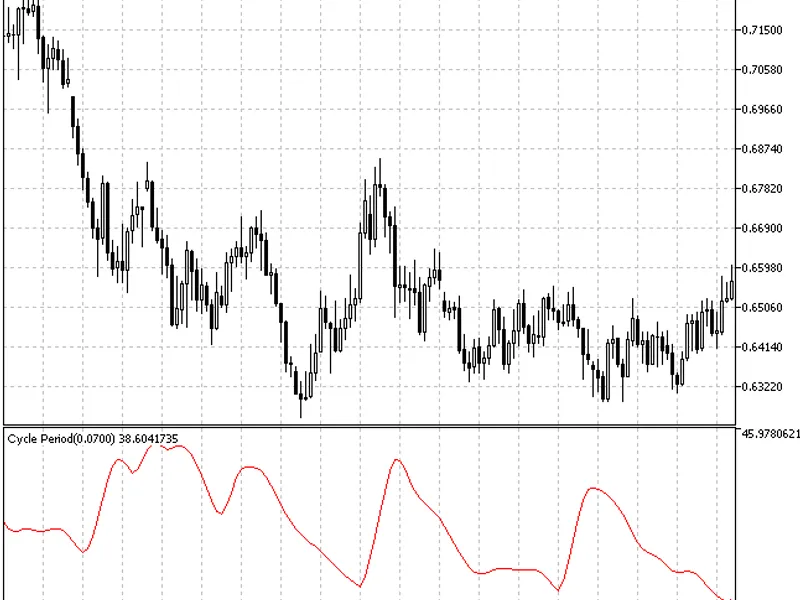
This indicator is designed for measurement of a financial asset price change periodicity.
The indicator stores in its indicator buffer the current market cycle values, which can never be stable for obvious reasons. This indicator is created to be used with oscillators to provide their adaptation to constantly changing market cycles and their transformation to adaptive ones.
The indicator is inspired by John Ehlers' article published in November 2002 in the magazine.
The CyclePeriod indicator handle variable must be declared on the global level to let the indicator be used in another indicator's code (for example, in RVI oscillator):
Then, the CyclePeriod indicator handle must be received in the RVI indicator initialization block:
Now, we have the new Alpha variable that is the input parameter of the used indicator and the period averaging ratio. This variable must be transformed to the developed indicator input variable.
The previous Length input variable must be removed from the list of the input parameters transforming it to the local variable inside the function.
The size of the arrays used for the indicator smoothing is fixed by the Length parameter value:
The value of this parameter is changing now. Therefore, it is better to set the sizes of these arrays to be not less than the assumed high value of this variable.
While analyzing the indicator charts, we can see that this value does not exceed 100. Therefore, the arrays sizes will have the same value:
And further on, period values for the current bar in the block must be taken from the CyclePeriod custom indicator buffer to let them be used instead of the value of the Length former input parameter.
In this case four last values are taken from the CyclePeriod indicator buffer and their linearly weighted smoothing is performed, after which the gained value is used as a Length smoothing period. And finally, the line at the end of the indicator code must be altered:
As a result, we have received Adaptive RVI oscillator: