Professional Close All Positions Panel
This professional-grade solution for MetaTrader 5 helps traders achieve greater efficiency in their daily workflow. This Expert Advisor serves as automated trading software. It is utilized to monitor financial markets and execute trades based on predefined algorithmic rules, enabling precise position management without the need for constant manual oversight.
How to Setup and Use Professional Close All Positions Panel
1. Installation: Open the "File" menu, select "Open Data Folder," navigate to MQL/Experts, paste your file, and restart the terminal.
2. Activation: Drag the EA from the Navigator onto a chart, ensure "Allow live trading" is checked in the Common tab, and verify the AutoTrading button is green.
3. Optimization: Right-click your chart, choose "Expert List," click "Properties" to adjust inputs, and save your preferred setup as a set file for future use.
4. Maintenance: Regularly check the "Experts" tab in the terminal window to monitor trade logs and potential execution errors.
Frequently Asked Questions
Q: Why is my EA not opening trades? A: Check the "AutoTrading" button, ensure "Allow live trading" is enabled, and verify your broker allows automated trading on your account type.
Q: Can I run multiple EAs on one chart? A: No, each chart can only host one active EA; however, you can open multiple charts for different currency pairs to run several EAs.
Q: What does the "smiley face" icon mean? A: A smiley face in the top-right corner of the chart indicates the EA is successfully running; a frowny face means it is disabled.
Description & Settings
// See attached MQ5 file for full source code
Emergency position management made easy with this powerful visual panel.
🎯 WHAT IT DOES
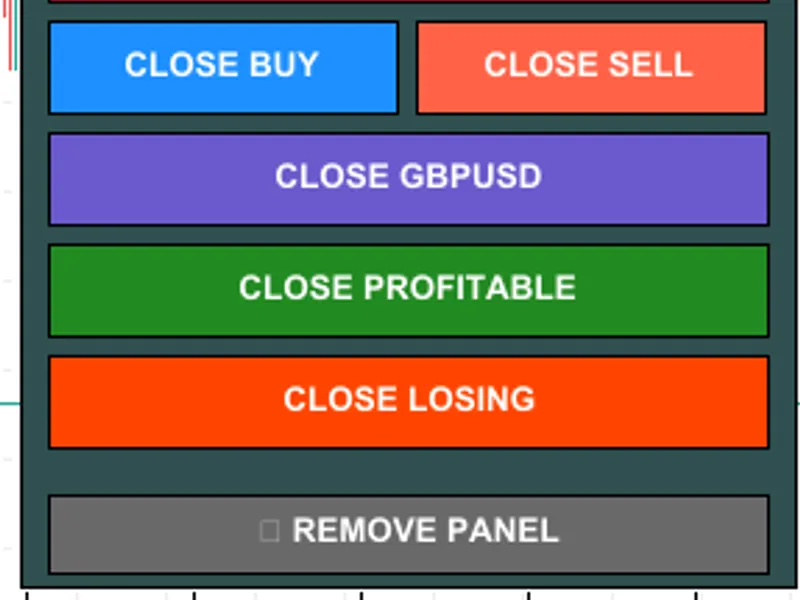
Professional Expert Advisor that adds a sleek control panel to your chart for instant position closing with advanced filtering options. Perfect for emergency situations, news events, or quick risk management decisions.
✨ KEY FEATURES
- Close ALL positions instantly with one click
- Close only BUY positions
- Close only SELL positions
- Close positions for current symbol only
- Close only PROFITABLE positions
- Close only LOSING positions
- Real-time position counter and P&L display
- Color-coded profit/loss indicators (green=profit, red=loss)
- Safety confirmation dialogs showing P&L before closing
- Easy panel removal button
- Fully customizable colors and panel position
- Works on ALL symbols and timeframes
- Zero lag with instant execution
🛡️ SAFETY FIRST
Every close action requires your confirmation with a dialog showing the exact P&L amount before execution. You'll never accidentally close positions.
💡 PERFECT FOR
✓ Emergency position exits during unexpected news
✓ Quick profit-taking when target is reached
✓ Rapid loss cutting to protect your account
✓ End-of-day position cleanup
✓ Professional risk management
✓ Scalpers and day traders
✓ News traders who need instant exits
🎨 FULL CUSTOMIZATION
- Choose panel position (any of 4 corners)
- Customize X and Y distance from corner
- Change all colors (background, buttons, text)
- Professional color schemes included
📊 REAL-TIME INFORMATION
The panel continuously updates showing:
- Total open positions count
- Total P&L in your account currency
- Buy positions count and P&L
- Sell positions count and P&L
- Everything color-coded for instant clarity
⚙️ INPUT PARAMETERS
All settings are simple and well-documented:
- Panel Corner - Choose display location
- Panel X/Y Distance - Fine-tune position
- Colors - Background, buttons, text
- All parameters have clear descriptions
🚀 SUPER EASY TO USE
1. Drag EA onto any chart
2. Enable AutoTrading (green button in toolbar)
3. Panel appears automatically
4. Click any button to close positions
5. Confirm the action
6. Done! Remove panel when finished
⚡ HIGH PERFORMANCE
- Ultra-lightweight code
- No CPU overhead or memory issues
- Instant button response
- Handles 100+ positions with ease
- No lag even during high volatility
✅ TESTED & RELIABLE
Thoroughly tested on multiple brokers, account types, and market conditions. Includes comprehensive error handling, detailed logging, and smart order filling modes (FOK/IOC/RETURN) for maximum compatibility.
🆓 COMPLETELY FREE
- No hidden costs
- No limitations on positions
- No expiration date
- No trial period
- 100% free forever
📞 EXCELLENT SUPPORT
Have questions or issues? Leave a comment and I'll respond quickly! I'm committed to helping users get the most out of this tool.
⭐⭐⭐⭐⭐ PLEASE RATE IF HELPFUL! ⭐⭐⭐⭐⭐
If this EA saves you time or money, please take 10 seconds to rate it!
Your rating helps other traders discover this free tool.
Thank you for your support! 🙏
---
📥 INSTALLATION INSTRUCTIONS
1. Download the file
2. Open MetaTrader 5
3. Open MetaEditor (press F4 or Tools → MetaQuotes Language Editor)
4. File → Open Data Folder
5. Copy the EA file to MQL5 → Experts folder
6. Restart MT5 or refresh Navigator (right-click → Refresh)
7. Drag "OneClickCloseAll" from Navigator → Expert Advisors onto any chart
8. Click "OK" on the settings window
9. Ensure "AutoTrading" button is enabled (green) in toolbar
10. Panel appears on your chart - ready to use!
⚠️ IMPORTANT REQUIREMENTS
- MetaTrader 5 platform
- AutoTrading must be enabled (green button)
- Works on any symbol and timeframe
- Demo and live accounts supported
- All brokers compatible
🔧 TROUBLESHOOTING
If buttons don't work:
1. Check AutoTrading is ON (green button)
2. Check Tools → Options → Expert Advisors → "Allow automated trading" is checked
3. Recompile the EA if needed (F7 in MetaEditor)
4. Check Experts tab for error messages
💬 FEEDBACK WELCOME
I'm always looking to improve! If you have feature requests or suggestions, please leave a comment.
---
v1.00 - Initial release
- Six position closing filters
- Real-time P&L display
- Safety confirmations
- Full customization
- Professional GUI
---
🎁 MORE FREE TOOLS COMING SOON
Follow me for more free trading utilities!