Cronex Super Position
This professional-grade solution for MetaTrader 5 helps traders achieve greater efficiency in their daily workflow. This technical indicator acts as a specialized analysis tool designed to visualize market data. It helps traders identify emerging trends, momentum shifts, and key support or resistance levels by plotting statistical calculations directly onto price charts.
How to Setup and Use Cronex Super Position
1. Installation: Place your file in the MQL/Indicators folder via "Open Data Folder" and restart your terminal.
2. Loading: Find the indicator in the Navigator, drag it onto your chart, and configure the input parameters in the popup window.
3. Customization: Press Ctrl+I to open the indicator list, select your tool, and click "Properties" to change colors, levels, or visual styles.
4. Updating: Replace the old file in the Indicators folder with the new version and restart the platform to apply changes.
Frequently Asked Questions
Q: Why is my indicator not showing? A: Verify the file is in the MQL/Indicators folder, or try right-clicking the "Indicators" tree in the Navigator and clicking "Refresh."
Q: Do custom indicators slow down the platform? A: Too many complex indicators can impact performance; remove unused ones via the "Indicator List" (Ctrl+I).
Q: Can I use MT4 indicators on MT5? A: No, MQL4 and MQL5 are distinct languages; ensure the indicator is compiled specifically for your platform version.
Description & Settings
Cronex
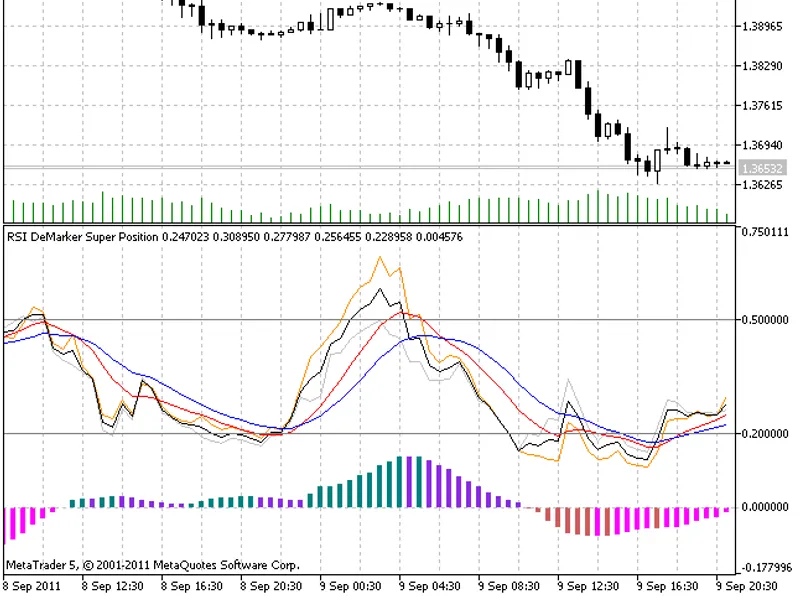
Superposition of and technical indicators.
As a rule, it takes too much time to switch between the periods and the indicator parameters to compare the behaviour and reveal the genuine dynamics of the indicators.
This indicator was created after the working space of the terminal was completely filled by a set of standard indicators having various parameters.
The things that are calculated:
Four lines with different periods (the interval changing period is specified in the indicator parameters) form the average weighted indicator part according to RSI;
Four lines with different periods (the interval changing period is specified in the indicator parameters) form the average weighted indicator part according to DeMarker;
Indications of the averages are reduced to a unified display system because of the difference between RSI and DeMarker indicators;
Superposition concerning these two indicators is based on the average built from RSI and DeMarker;
To ease the interpretation two MA are put on a superposition line;
The histogram of the difference between RSI and DeMarker weighted averages is shown to make the picture complete.
As a result, we managed to gather two characteristics of different period and dynamics. It is widely known that RSI and DeMarker behave differently in case of uncertain situations on a chart and also relative to themselves in case of the indicators various periods. Therefore, I think, it is quite useful to see this difference.
The indicator uses the СMoving_Average class of the SmoothAlgorithms.mqh library. Working with that class was described in details in the article .
This indicator was first implemented in MQL4 and published in 14.01.2008.