










adaptive cc i
Info
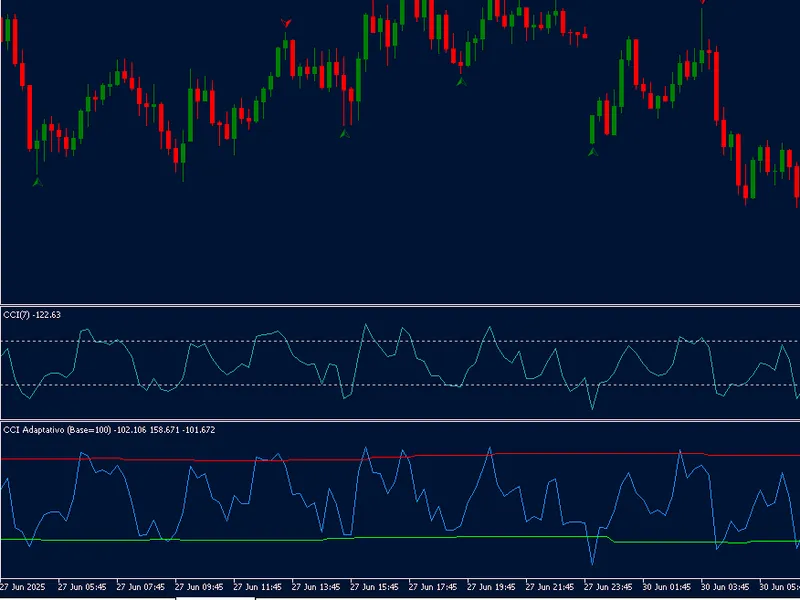
The adaptive cc i is a Indicator for MetaTrader 5 that adaptive cci - dynamic commodity channel index overview the adaptive cci indicator revolutionises the traditional commodity channel index by replacing fixed thresholds (100/-100) with dynamically adjusting upper and lower limits that adapt to the current market volatility. instead of using arbitrary levels that work poorly across different assets and market conditions, this indicator automatically calculates optimal overbought and oversold levels based on the actual price behaviour.
Usage
This tool is typically used for enhancing chart analysis and decision making.
Platform
This Indicator works exclusively on MetaTrader 5 (both build 600+ and newer versions).
Setup
Place the downloaded file in MQL5/Indicators folder via File ? Open Data Folder in MetaTrader 5.
How to Install and Use adaptive cc i
1. Installation: Place your file in the MQL/Indicators folder via "Open Data Folder" and restart your terminal.
2. Loading: Find the indicator in the Navigator, drag it onto your chart, and configure the input parameters in the popup window.
3. Customization: Press Ctrl+I to open the indicator list, select your tool, and click "Properties" to change colors, levels, or visual styles.
4. Updating: Replace the old file in the Indicators folder with the new version and restart the platform to apply changes.
Frequently Asked Questions
Q: Why is my indicator not showing? A: Verify the file is in the MQL/Indicators folder, or try right-clicking the "Indicators" tree in the Navigator and clicking "Refresh."
Q: Do custom indicators slow down the platform? A: Too many complex indicators can impact performance; remove unused ones via the "Indicator List" (Ctrl+I).
Q: Can I use MT4 indicators on MT5? A: No, MQL4 and MQL5 are distinct languages; ensure the indicator is compiled specifically for your platform version.
What this tool does
adaptive cci - dynamic commodity channel index overview the adaptive cci indicator revolutionises the traditional commodity channel index by replacing fixed thresholds (100/-100) with dynamically adjusting upper and lower limits that adapt to the current market volatility.
Typical Use Case
This Indicator excels in automated trading and technical analysis on MetaTrader 5.
Compatible Platform & Setup
This Indicator works on MetaTrader 5. Place the file in the MQL5/Indicators folder and restart the terminal.
Description & Settings
Related: xander adaptive cross: trend identification tool - another powerful indicator for MetaTrader 5 traders.
adaptive cci - dynamic commodity channel index
Also recommended: heiken ashi indicator with adaptive moving average - similar indicator with strong performance on MetaTrader 5.
overview
the adaptive cci indicator revolutionises the traditional commodity channel index by replacing fixed thresholds (100/-100) with dynamically adjusting upper and lower limits that adapt to the current market volatility. instead of using arbitrary levels that work poorly across different assets and market conditions, this indicator automatically calculates optimal overbought and oversold levels based on the actual price behaviour.
key features
dynamic threshold adjustment
: upper and lower limits automatically adapt to market volatility using exponential moving average (ema) of detected peaks and troughs
volatility-based smoothing
: adjusts responsiveness based on atr (average true range), becoming more sensitive during high volatility and more stable during low volatility
no more false signals
: eliminates signals generated during sideways markets where traditional cci would give false overbought/oversold readings
asset-specific calibration
: works optimally for any asset without manual threshold adjustments
strategy tester compatible
: functions correctly in both real-time trading and historical backtesting
how it works
peak/trough monitoring
: tracks cci values between threshold crossings
ema-based adaptation
: uses exponential moving average to smooth the dynamic thresholds
volatility adjustment
: automatically modifies the ema smoothing factor based on current market volatility
real-time updates
: thresholds continuously update as new price data arrives
how to use
overbought condition
: when cci crosses above the dynamic upper limit (red line)
oversold condition
: when cci crosses below the dynamic lower limit (green line)
reversal signals
: look for price reversals when cci exits the overbought/oversold zones
trend confirmation
: use alongside price action for higher probability entries
inputs
cci_period
: cci calculation period (default: 14) - increase for more smoothing
basethreshold
: base threshold for peak/trough detection (default: 100)
ema_smoothing
: ema smoothing factor (0.1-0.3, default: 0.2) - higher values react faster
atr_period
: atr period for volatility measurement (default: 14)
volatilityfactor
: volatility adjustment factor (default: 0.5)
trading strategies
reversal trading
: enter long when price reverses upward after cci crosses below dynamic lower limit
trend following
: use as confirmation - only take trend trades when cci is not in overbought/oversold territory
divergence detection
: look for divergences between price and cci with dynamic thresholds
multi-timeframe analysis
: apply on higher timeframe for trend direction, lower timeframe for entries
pro tips
- for **highvolatility assets**(crypto, gbp pairs): increase basethreshold to 110-120 - for **lowvolatility assets**(major forex pairs): decrease basethreshold to 90-100 - combine with price action for higher probability signals - works best on h1 and higher timeframes but can be used on lower timeframes with adjusted parameters - the dynamic thresholds provide better signal quality than fixed levels during different market regimes
why it's better than traditional cci
traditional cci uses fixed thresholds (100/-100) that work well in some markets but poorly in others. the adaptive cci solves this fundamental limitation by: - automatically adjusting to each asset's unique volatility profile - reducing false signals during sideways markets - maintaining sensitivity during trending markets - providing statistically relevant overbought/oversold levels
You may also like: fractal adaptive moving average (frama) - excellent alternative for indicator users on MetaTrader 5.
Source Code
яю//+------------------------------------------------------------------+
#property copyright "RobotFX"
#property link "https://robotfx.org"
#property version   "1.0"
#property description "Educational code - RobotFX www.robotfx.org"
#property indicator_separate_window
#property indicator_buffers 3
#property indicator_plots   3
#property indicator_type1   DRAW_LINE
#property indicator_color1  clrDodgerBlue
.......
⚠ Limitations & Risk Warning
- This tool is provided for educational and testing purposes only.
- Past performance does not guarantee future results.
- Trading involves substantial risk of loss. Use on a demo account first.
- Results may vary depending on market conditions, broker, and settings.
- We recommend thorough backtesting and forward testing before using with real funds.