









Trade-Request Matrix: Regression Testing Invalid Order Parameters with OrderCheck()
Info
The Trade-Request Matrix: Regression Testing Invalid Order Parameters with OrderCheck() is a Expert Advisor for MetaTrader 5 that trade-request matrix: regression testing invalid order parameters with ordercheck()this is the fourth part of a series focused on ensuring trade request accuracy. Previous parts have covered incremental vs.
Usage
This tool is typically used for automated trading on major forex pairs and gold.
Platform
This Expert Advisor works exclusively on MetaTrader 5 (both build 600+ and newer versions).
Setup
Place the downloaded file in MQL5/Experts folder via File ? Open Data Folder in MetaTrader 5.
How to Install and Use Trade-Request Matrix: Regression Testing Invalid Order Parameters with OrderCheck()
1. Installation: Open the "File" menu, select "Open Data Folder," navigate to MQL/Experts, paste your file, and restart the terminal.
2. Activation: Drag the EA from the Navigator onto a chart, ensure "Allow live trading" is checked in the Common tab, and verify the AutoTrading button is green.
3. Optimization: Right-click your chart, choose "Expert List," click "Properties" to adjust inputs, and save your preferred setup as a set file for future use.
4. Maintenance: Regularly check the "Experts" tab in the terminal window to monitor trade logs and potential execution errors.
Frequently Asked Questions
Q: Why is my EA not opening trades? A: Check the "AutoTrading" button, ensure "Allow live trading" is enabled, and verify your broker allows automated trading on your account type.
Q: Can I run multiple EAs on one chart? A: No, each chart can only host one active EA; however, you can open multiple charts for different currency pairs to run several EAs.
Q: What does the "smiley face" icon mean? A: A smiley face in the top-right corner of the chart indicates the EA is successfully running; a frowny face means it is disabled.
What this tool does
Trade-Request Matrix: Regression Testing Invalid Order Parameters with OrderCheck()This is the fourth part of a series focused on ensuring trade request accuracy.
Typical Use Case
This Expert Advisor excels in automated trading and technical analysis on MetaTrader 5.
Compatible Platform & Setup
This Expert Advisor works on MetaTrader 5. Place the file in the MQL5/Experts folder and restart the terminal.
Description & Settings
Related: exp x2 ma digit dm 361 Trend Following System - another powerful expert for MetaTrader 5 traders.
Trade-Request Matrix: Regression Testing Invalid Order Parameters with OrderCheck()Also recommended: SAR Indicator EA - similar expert with strong performance on MetaTrader 5.
This is the fourth part of a series focused on ensuring trade request accuracy. Previous parts have covered incremental vs. scratch calculations, recursive indicator history, and the immutability of closed bar values. This part focuses on the Expert Advisor (EA) that translates signals into trade requests, specifically testing how the server handles requests with minor inaccuracies. Common rejections include 10016 (invalid stops), 10014 (invalid volume), and close errors 10036, 10038, and 10025.
Indicators cannot directly execute trade functions, so this part is implemented as an Expert Advisor. It tests the order layer, crucial for all indicator-driven EAs, functioning as a regression suite. It constructs 20 distinct requests based on current symbol rules and validates them using OrderCheck(), which simulates server validation without actually sending the order. No orders are placed, opened, closed, or modified during this process.
Each row in the test suite includes a prediction based on documented rules, not server responses.
Boundary Rows:
Tests stops placed exactly at the allowed stop level, and one point inside it. These are crucial for identifying off-by-one errors in both custom code and server rules. For BUY orders, stop loss and take profit distances are measured from the Bid price; for SELL orders, from the Ask price.
Wrong-Side Rows:
Tests stop loss placements that are on the incorrect side of the current price (e.g., a BUY stop loss above the Bid). These should always be rejected, irrespective of the stop level.
Volume Rows:
Tests volume submissions that are below the minimum, above the maximum, or fall between defined volume steps. This ensures correct lot size normalization.
Close and Modify Rows:
These rows utilize the first open position for the tested symbol (read-only). They test scenarios such as a full position close, closing a volume exceeding the open position, attempting to close a non-existent ticket, modifying an order that results in no change, and modifying with a stop loss on the wrong side. These should all be refused.
The verdict for each row compares the retcode from OrderCheck() with the prediction:
Verdict
Meaning
PASS
A valid request was accepted (retcode 0 or 10009), or an invalid request was correctly refused with a predicted code.
FAIL
A valid request was refused, an invalid request was accepted, or it was refused with an unexpected code. This indicates a change in either the request builder logic or the server rules.
INCONCLUSIVE
The server could not process the request due to reasons like market closure (10018), trading disabled (10017), insufficient funds (10019), no quotes available (10021), excessive requests (10024), algo trading disabled (10026, 10027), freezing (10029), or no connection (10031). These rows are neither pass nor fail.
n/a
The row could not be generated for the current symbol or account (e.g., inside-the-limit rows when the stops level is 0, or close rows when no position is open). n/a rows do not count as a pass.
The 20 test rows are structured as follows:
Row Number
Row Description
Prediction
What it Catches
1-2
BUY and SELL market orders, no stops
accept
Controls fundamental settings like filling mode, account type, and symbol rules. Failures here invalidate subsequent tests.
3-6
BUY SL, BUY TP, SELL SL, SELL TP exactly at the stops level
accept
Detects code that adds a safety margin or servers that treat the level as exclusive.
7-10
The same four stops one point inside the stops level
10016
Identifies code that incorrectly rounds stop distances or servers with incorrect boundary logic. n/a if stops level is 0.
11-12
BUY SL above the price, SELL SL below the price
10016
Catches swapped Bid and Ask prices or incorrect sign usage for order direction.
13-15
Volume below minimum, above maximum, or off the volume step grid
10014
Tests lot size normalization accuracy. Row 15 is n/a if the volume step is 0.
16
Close the position, full volume
accept
Control for the close path, verifying order type, position ticket, and price accuracy.
17
Close a volume larger than the position
10038 or 10014
Detects errors in partial close calculations that do not respect the open position volume.
18
Close a ticket that does not exist
10036 or 10013
Checks for handling of stale tickets after a position has already been closed.
19
Modify with the current stop loss and take profit
10025
Identifies aggressive trailing stop code that sends modifications on every tick.
20
Modify with the stop loss on the wrong side
10016
Catches trailing stop code that incorrectly moves the stop loss to the wrong side of the price.
Interpreting the Results
Result Panel (Top Left):
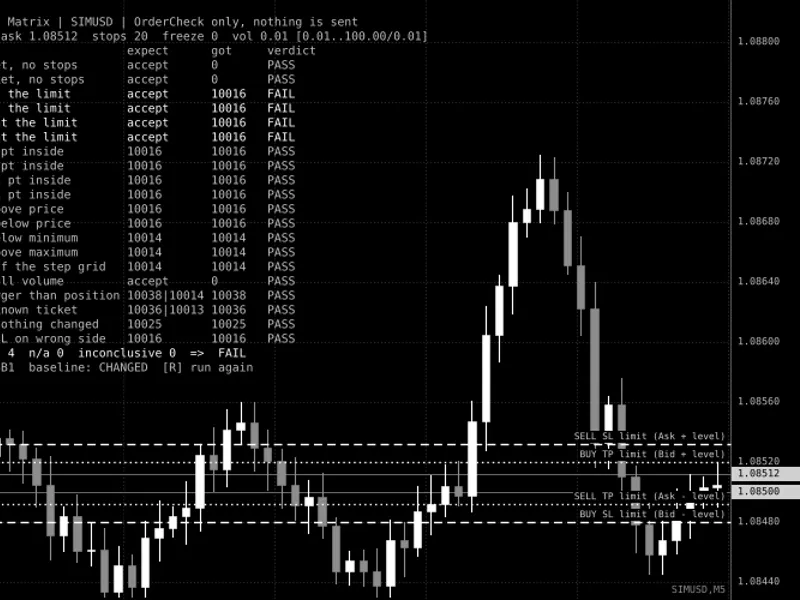
Each row displays its number, title, prediction, the retcode returned by OrderCheck(), and the verdict. Rows marked FAIL are highlighted. Predictions with multiple codes (e.g., 10038|10014) are satisfied if either code is returned, accounting for server variations.
Header Lines:
The initial lines show the symbol being tested and the parameters used for the rows: Bid, Ask, stops level, freeze level, base volume, and volume limits/step.
Summary Line:
Provides counts of PASS, FAIL, n/a, and INCONCLUSIVE rows, along with an overall verdict. The overall verdict is FAIL if any row fails, INCONCLUSIVE if any row is inconclusive (and no rows failed), and PASS otherwise.
Digest Line:
An 8-digit hexadecimal FNV-1a hash of the row numbers, verdicts, and retcodes. This digest can be compared against a baseline digest from a known-good run. Subsequent runs will show MATCH or CHANGED, providing a quick indicator of any changes in server rules, account settings, or the EA build. Digests are symbol, server, and account-specific.
Dashed and Dotted Lines on Chart:
Four lines represent the stops level boundaries around current prices: dashed lines for stop loss limits (Bid - level, Ask + level) and dotted lines for take profit limits (Bid + level, Ask - level). These correspond to boundary rows 3-6 and 7-10. A valid stop loss must be placed outside its respective line. If the stops level is 0, InpFallbackStopPoints is used, and these lines are described in chart properties.
Experts Journal:
With InpLogResults enabled, each row and the summary are printed to the Experts journal, facilitating bug reporting.
External Variables (Inputs)
Input Name
Default Value
Purpose
InpSymbol
"" (chart symbol)
Symbol to test. Automatically added to Market Watch if not present.
InpVolume
0.0
Base volume for tests requiring valid volume. 0 uses the symbol's minimum lot size. Values are normalized to the volume grid and clamped between min/max.
InpUsePosition
true
Determines if an open position is used for close and modify rows (16, 17, 19, 20). If false, these rows are marked n/a. The position is only read.
InpPositionMagic
-1
Filters positions by magic number. -1 uses the first available position for the symbol.
InpFallbackStopPoints
50
Points used for stop level boundary tests when the stops level is 0. Inside rows are n/a in this case.
InpWrongSidePoints
100
Distance in points from the price for wrong-side stop tests (rows 11, 12, 20).
InpRunOnStart
true
Automatically runs the matrix upon EA startup once quotes are available. If false, requires manual trigger (R key).
InpAutoRepeatSec
0
Sets the auto-repeat interval in seconds. 0 disables repetition; values 1-4 are set to 5.
InpLogResults
true
Enables logging of each row and summary to the Experts journal.
InpBaselineDigest
"" (off)
Stores the digest of a known-good run for comparison. Shows MATCH or CHANGED.
InpShowPanel
true
Enables or disables the display of the results panel.
InpShowLevels
true
Enables or disables drawing the stops-level lines on the chart.
InpTextColor
clrSilver
Color for the panel text.
InpFailColor
clrWhite
Color for FAIL rows and failing summary lines. Can be set to red for visibility.
InpFontSize
8
Font size for the panel display (Consolas). Line height adjusts accordingly.
InpPanelX, InpPanelY
8, 14
Offset in pixels from the chart's upper-left corner for the panel position.
Recommended Usage
Installation:
Place the EA file in MQL5\Experts, compile, and attach it to a chart. Press R on the chart to re-run the matrix. It is recommended to start with a demo account to familiarize yourself with the panel and results.
Execution Location:
Run the EA on a live or demo chart of the broker you intend to test. The Strategy Tester uses simulated rules and does not reflect actual broker behavior. Test each symbol type (forex, metals, indices, stocks) separately, as parameters like stops level and volume step vary.
Timing:
Execute the matrix after modifying order-building code in an EA, after broker or server updates, after platform updates, or when starting to trade a new symbol. Maintain the baseline digest from the last successful run in InpBaselineDigest.
Market Hours:
The matrix requires the market to be open for accurate testing. If the market is closed or trading is disabled, most rows will result in inconclusive codes (10018, 10017), providing no meaningful test results. Rerun during active trading hours. Disabled algo trading can also lead to inconclusive results.
Server Retcode Variations:
While predictions align with documented rules, servers may report different retcodes for the same refusal. Rows 17 and 18 accept multiple codes to accommodate this. If a FAIL occurs with an unexpected code, verify the actual retcode in the panel before concluding a bug; the request would still have been rejected.
Stops Level 0:
When the stops level is 0 (dynamic), the matrix uses InpFallbackStopPoints for boundary tests and marks inner rows as n/a. The freeze level is for informational purposes. Modifications within the freeze level may result in an inconclusive code (10029).
Position-Dependent Rows:
Rows 16, 17, 19, and 20 require an open position on the tested symbol. Use an existing position or open a minimal one manually on a demo account. The EA does not manage this position. Row 18 does not require an open position.
Margin and Money:
OrderCheck() also verifies available margin. On accounts with insufficient free margin, valid requests may return an inconclusive code (10019), which is not considered a failure.
Meaning of a PASS:
A PASS verdict signifies that the server's responses to the 20 test requests align with the documented rules. This test does not cover pending orders, expirations, stop-limit orders, close-by operations, trade time restrictions, or real execution behaviors like slippage, requotes, or partial fills. These require separate tests or live trading on a demo account.
Account Types:
Both netting and hedging account types are supported. On netting accounts, where only one position per symbol exists, the close and modify rows will utilize that single position.
You may also like: vinci ea - excellent alternative for expert users on MetaTrader 5.
Source Code
#property copyright "RobotFX"
#property link "https://robotfx.org"
#property version     "1.00"
#property description "This code is educational. Feel free to use, modify and upgrade as you wish. Visit ROBOTFX.ORG for professional trading tools"
#define PREFIX            "TRM_"
#define ROWS              20
#define PANEL_LINES       (ROWS + 5)
#define UNKNOWN_TICKET    4294967294
#define KEY_R             82
enum ENUM_VERDICT
.......
⚠ Limitations & Risk Warning
- This tool is provided for educational and testing purposes only.
- Past performance does not guarantee future results.
- Trading involves substantial risk of loss. Use on a demo account first.
- Results may vary depending on market conditions, broker, and settings.
- We recommend thorough backtesting and forward testing before using with real funds.