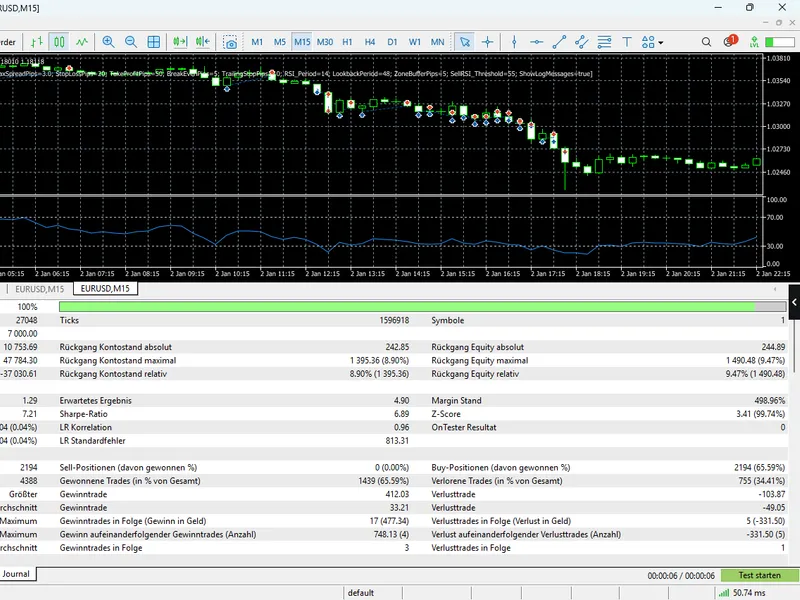
Silvios EAbest26
This professional-grade solution for MetaTrader 5 helps traders achieve greater efficiency in their daily workflow. This Expert Advisor serves as automated trading software. It is utilized to monitor financial markets and execute trades based on predefined algorithmic rules, enabling precise position management without the need for constant manual oversight.
How to Setup and Use Silvios EAbest26
1. Installation: Open the "File" menu, select "Open Data Folder," navigate to MQL/Experts, paste your file, and restart the terminal.
2. Activation: Drag the EA from the Navigator onto a chart, ensure "Allow live trading" is checked in the Common tab, and verify the AutoTrading button is green.
3. Optimization: Right-click your chart, choose "Expert List," click "Properties" to adjust inputs, and save your preferred setup as a set file for future use.
4. Maintenance: Regularly check the "Experts" tab in the terminal window to monitor trade logs and potential execution errors.
Frequently Asked Questions
Q: Why is my EA not opening trades? A: Check the "AutoTrading" button, ensure "Allow live trading" is enabled, and verify your broker allows automated trading on your account type.
Q: Can I run multiple EAs on one chart? A: No, each chart can only host one active EA; however, you can open multiple charts for different currency pairs to run several EAs.
Q: What does the "smiley face" icon mean? A: A smiley face in the top-right corner of the chart indicates the EA is successfully running; a frowny face means it is disabled.
Description & Settings
Dynamic Price Zones:
The EA continuously calculates the highest high and lowest low of the last 48 candles ( LookbackPeriod ) to identify key supply and demand levels.
Entry Trigger:
Trades are initiated when the price enters a predefined buffer zone ( ZoneBufferPips ). This allows for precise entries just before the market pivots at historical resistance or support.
Momentum Confirmation:
To filter out false breakouts, the RSI indicator must confirm the move:
BUY:
Price touches the lower zone + RSI < 40.
SELL:
Price touches the upper zone + RSI > 55 (an optimised threshold for maximum win rate).
Risk Management & Trade Protection
Dynamic Lot Sizing:
Position sizes are automatically calculated based on account balance and a user-defined risk percentage ( RiskPercent ).
Advanced Protection:
Every trade is equipped with a fixed Stop Loss and Take Profit.
Profit Locking:
An integrated
Break-Even
function and a
Trailing Stop
work automatically to secure profits as the trade moves in your favour.
Smart Exit:
The system monitors overbought/oversold conditions and can close positions early if the RSI reaches extreme opposite values.
Technical Features
Live Dashboard:
Essential data including current RSI, Spread, Risk, and the assigned
Magic Number
are displayed directly on the chart.
Optimised Performance:
Fully compatible with MT5 (Hedge/Netting accounts), zero compiler warnings, and detailed diagnostic logging in the experts' tab.
User-Friendly Customisation:
All parameters-including lookback periods, RSI thresholds, and pip values-are fully adjustable to suit different market conditions.