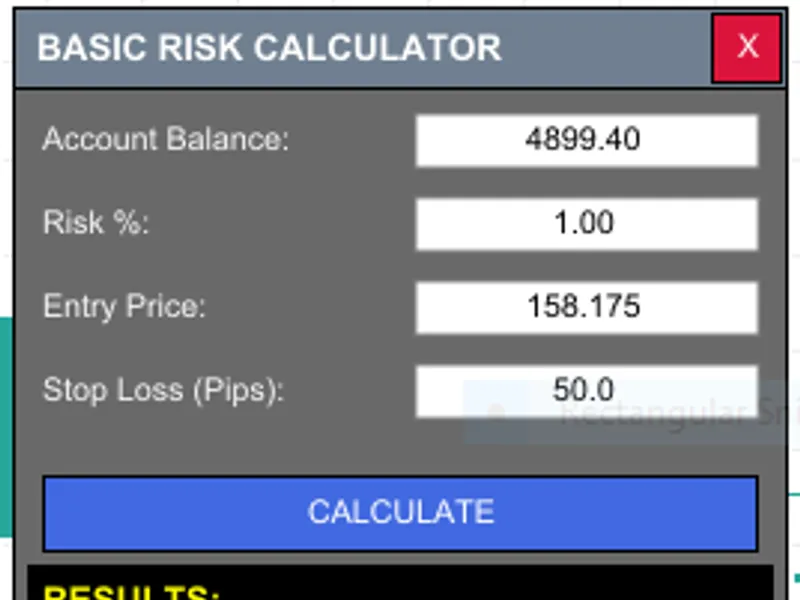
Position Size Pro Lite: Interactive Risk Calculator Panel
This software component for MetaTrader 5 is built to enhance the capabilities of your trading environment. This Expert Advisor serves as automated trading software. It is utilized to monitor financial markets and execute trades based on predefined algorithmic rules, enabling precise position management without the need for constant manual oversight.
How to Setup and Use Position Size Pro Lite: Interactive Risk Calculator Panel
1. Installation: Open the "File" menu, select "Open Data Folder," navigate to MQL/Experts, paste your file, and restart the terminal.
2. Activation: Drag the EA from the Navigator onto a chart, ensure "Allow live trading" is checked in the Common tab, and verify the AutoTrading button is green.
3. Optimization: Right-click your chart, choose "Expert List," click "Properties" to adjust inputs, and save your preferred setup as a set file for future use.
4. Maintenance: Regularly check the "Experts" tab in the terminal window to monitor trade logs and potential execution errors.
Frequently Asked Questions
Q: Why is my EA not opening trades? A: Check the "AutoTrading" button, ensure "Allow live trading" is enabled, and verify your broker allows automated trading on your account type.
Q: Can I run multiple EAs on one chart? A: No, each chart can only host one active EA; however, you can open multiple charts for different currency pairs to run several EAs.
Q: What does the "smiley face" icon mean? A: A smiley face in the top-right corner of the chart indicates the EA is successfully running; a frowny face means it is disabled.
Description & Settings
Basic Risk Calculator
is a professional trading utility designed to solve the most common problem in manual trading:
Position Sizing.
Instead of guessing your lot size, this tool calculates the exact volume you need based on your specific risk appetite, ensuring you never over-leverage your account.
🎯
WHAT IT DOES
A sleek, on-chart control panel that instantly calculates your lot size. It takes your account balance, preferred risk percentage, and stop loss distance to give you a precise volume for your next trade.
✨
KEY FEATURES
Real-time Position Sizing:
Calculate lots instantly as you type.
Automatic Balance Detection:
Pulls your current account balance automatically.
Dynamic Pip Valuation:
Works on all symbols (Forex, Gold, Oil, Indices) by calculating the specific tick value.
Safety Lot Rounding:
Rounds lot sizes to your broker's specific "Lot Step" (e.g., 0.01).
Interactive GUI:
A clean, draggable panel that doesn't clutter your chart.
Risk in Currency:
See exactly how many dollars (or your account currency) you are risking.
Zero Lag:
Lightweight, event-driven code that won't slow down your platform.
🛡️
SAFETY FIRST
The calculator ensures that the lot size never exceeds your broker's maximum allowed volume and never goes below the minimum lot size, preventing execution errors.
💡
PERFECT FOR
✓ Manual traders, Scalpers, and Day Traders. ✓ New traders learning the importance of the "1% Risk Rule." ✓ Prop Firm traders who must stay within strict drawdown limits.
Price Mode Toggle:
Switch instantly between
Live Current Price
or
Specific Price
entry for pending orders.
Auto-Refresh System:
Real-time updates every 2 seconds with a dedicated
ON/OFF toggle
.
Risk Preset Buttons:
Instant
1%, 2%, and 3% buttons
—no more manual typing.
Take Profit Calculator:
Full profit potential display based on your TP pips.
Risk:Reward Ratio:
Live display of your
R:R Ratio
(e.g., 1:2.00) for every trade.
Tick-Sync Technology:
In Current Price mode, the entry price updates automatically with every market tick.
Premium UI:
Polished, larger dashboard (280x480) with a professional Navy/SeaGreen color scheme.
SL Price Field:
Dedicated input for exact stop loss price levels.
Smart Workflow:
Read-only fields auto-lock/unlock based on your selected mode for a mistake-proof experience.
🚀
SUPER EASY TO USE
Drag the EA onto any chart.
Enter your Risk % and SL in Pips.
Click
CALCULATE
.
📥
INSTALLATION INSTRUCTIONS
Download the .mq5 file.
In MT5, press F4 to open MetaEditor.
Right-click the Experts folder ->
Open Folder
.
Copy the file into this folder and
Refresh
the Navigator in MT5.
Attach to chart; ensure
"Algo Trading"
are enabled.
✅
TESTED & RELIABLE
100% accurate tick value calculations for Forex, Metals, and CFDs.
⭐⭐⭐⭐⭐
PLEASE RATE IF HELPFUL!
⭐⭐⭐⭐⭐ If this calculator saves you time, please leave a 5-star review to support more free tools!