MQ L5 Wizard - Trading Signals of Candlestick Patterns + Stochastic
This is a powerful addition to your MetaTrader 5 toolkit designed to optimize market analysis and performance. This Expert Advisor serves as automated trading software. It is utilized to monitor financial markets and execute trades based on predefined algorithmic rules, enabling precise position management without the need for constant manual oversight.
How to Setup and Use MQ L5 Wizard - Trading Signals of Candlestick Patterns + Stochastic
1. Installation: Open the "File" menu, select "Open Data Folder," navigate to MQL/Experts, paste your file, and restart the terminal.
2. Activation: Drag the EA from the Navigator onto a chart, ensure "Allow live trading" is checked in the Common tab, and verify the AutoTrading button is green.
3. Optimization: Right-click your chart, choose "Expert List," click "Properties" to adjust inputs, and save your preferred setup as a set file for future use.
4. Maintenance: Regularly check the "Experts" tab in the terminal window to monitor trade logs and potential execution errors.
Frequently Asked Questions
Q: Why is my EA not opening trades? A: Check the "AutoTrading" button, ensure "Allow live trading" is enabled, and verify your broker allows automated trading on your account type.
Q: Can I run multiple EAs on one chart? A: No, each chart can only host one active EA; however, you can open multiple charts for different currency pairs to run several EAs.
Q: What does the "smiley face" icon mean? A: A smiley face in the top-right corner of the chart indicates the EA is successfully running; a frowny face means it is disabled.
Description & Settings
With , traders now can based on trading signals' classes, positions tracking and money management. Along with of the Standard Library, you can develop and test your own trading systems. To do this, just write a .
The book "" (in Russian) describes indicators and trading strategies for the technical analysis involving MetaStock software package. Along with the conventional trading signals, the book deals with the ones based on the combined use of reversal candlestick patterns with confirmations of , , and .
Using "reversal" candlestick patterns together with oscillator signals allows reducing the number of false signals and increasing the trading system's efficiency.
In previous publications, we have considered trading signals based on candlestick patterns with confirmation of :
In this description, we will consider the results of the combined use of all these models together with indicator signals.
1. Bullish and Bearish Candlestick Models and Their Detection
class also has the functions for detecting the forming of some of bullish and bearish candlestick patterns (except from Hammer/Hanging Man combination).
The forming of a bearish candlestick pattern is checked by CheckPatternAllBullish() function:
The forming of a bullish candlestick pattern is checked by CheckPatternAllBearish() function:
2. Trading Signals Combined with Stochastic Indicator
Opening a long/short position is performed when one of the bullish/bearish models is formed and there is a confirmation from the . %D signal line value should be above or below the appropriate critical level (30 and 70).
An exit signal is formed in two cases:
When an opposite candlestick pattern is formed (a bearish one for a long position and a bullish one for a short position).
According to the subsequent behavior of %D. If %D reaches the level that is opposite to the market (80 in case of a long and 20 in case of a short position) or if %D does not confirm the reversal signal and reaches 20 in case of a long position and 80 in case of a short one.
Checking the market entry and exit conditions is performed in the following methods:
int CCP_Stoch::LongCondition() - checking conditions for opening a long position (m_pattern_0) and closing a short one (m_pattern_1);
int CCP_Stoch::ShortCondition() - checking conditions for opening a short position (m_pattern_0) and closing a long one (m_pattern_1).
2.1. Opening a Long Position and Closing a Short One
The signal for opening a long position is forming a bullish candlestick combination and fulfilling StochSignal(1)<30 condition (the value of indicator's signal line at the last completed bar is less than 30);
The signal for closing a short position is forming one of the bullish candlestick patterns or the case when the indicator line crosses the 20-level line (upwards) or the 80-level one (upwards).
2.2. Opening a Short Position
and Closing a Long One
The signal for opening a short position is forming one of the bearish candlestick patterns and fulfilling StochSignal(1)>70 condition (the value of indicator's signal line at the last completed bar exceeds 70):
The signal for closing a long position is forming one of the bearish candlestick patterns or the case when the indicator line crosses the 80-level line (downwards) or the 20-level one (downwards).
2.3. Creating an Expert Advisor Based on Trading Signals of "Candlestick Patterns+Stochastic" Reversal Pattern Using MQL5 Wizard
CCP_Stoch class is not included to the Standard Library of trading signals. Therefore, download ccp_stoch.mqh file (attached) and save it to \terminal_folder\Include\Expert\Signal\MySignals directory to use it. candlepatterns.mqh file should be copied to the same directory as ccp_stoch.mqh. After that, relaunch MetaEditor to be able to use the file in MQL5 Wizard.
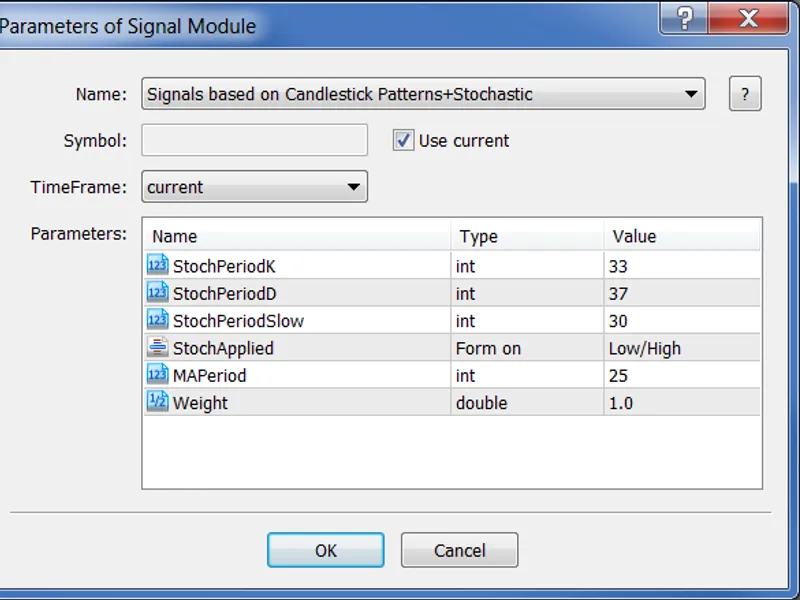
To create a trading robot following this strategy via , select "
Signals based on Candlestick Patterns+Stochastic
" signal type at the second step:
Fig. 1. Selecting "Signals based on Candlestick Patterns+Stochastic" trading signals generator in MQL5 Wizard
At the subsequent steps, specify the necessary type and system. The Expert Advisor's code is generated automatically. Now, it should be compiled to be ready to start testing.
2.4. Testing Results
Results of the Expert Advisor Testing on historical data (EURUSD H1, testing period: 1.1.2000-02.02.2011, PeriodK=33, PeriodD=37, PeriodSlow=30, MA_period=25).
This Expert Advisor uses the module for trading the fixed volume of 0.1 lot (). Trailing stop is not used ().
Fig. 2. Results of testing the Expert Advisor based on "Signals based on Candlestick Patterns+Stochastic" trading signals generator
The best set of trading system parameters can be found using the MetaTrader 5 .
The code of the Expert Advisor created by MQL5 Wizard is attached in expert_cp_stoch.mq5 file.