
manual trade on strategy tester
Info
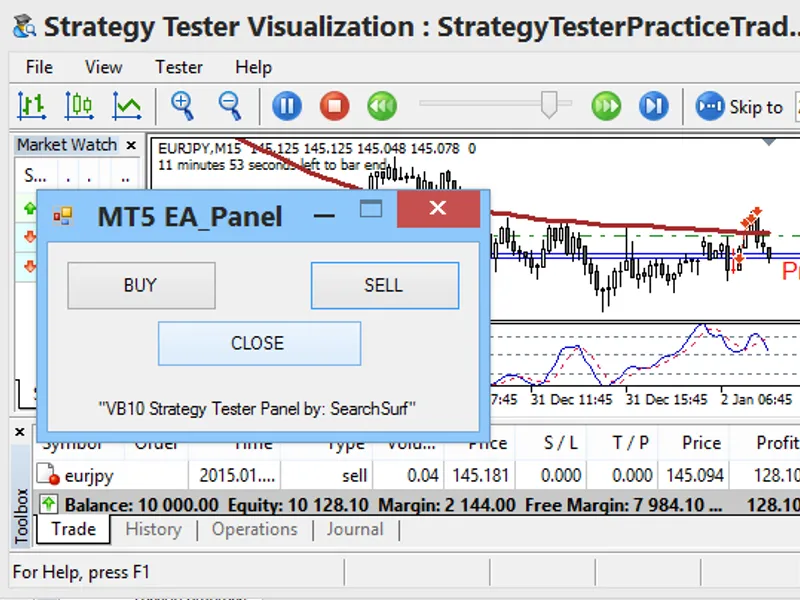
The manual trade on strategy tester is a Expert Advisor for MetaTrader 5 that here's one possible and a simple way to link a manual order for strategy tester use. most of us know already that chartevent doesn't work with strategy tester, and the simplest objects — or should i say the only objects (at this time using basic mql5 codes) that can be placed on the strategy tester are the "label" and the "button".
Usage
This tool is typically used for automated trading on major forex pairs and gold.
Platform
This Expert Advisor works exclusively on MetaTrader 5 (both build 600+ and newer versions).
Setup
Place the downloaded file in MQL5/Experts folder via File ? Open Data Folder in MetaTrader 5.
How to Install and Use manual trade on strategy tester
1. Installation: Open the "File" menu, select "Open Data Folder," navigate to MQL/Experts, paste your file, and restart the terminal.
2. Activation: Drag the EA from the Navigator onto a chart, ensure "Allow live trading" is checked in the Common tab, and verify the AutoTrading button is green.
3. Optimization: Right-click your chart, choose "Expert List," click "Properties" to adjust inputs, and save your preferred setup as a set file for future use.
4. Maintenance: Regularly check the "Experts" tab in the terminal window to monitor trade logs and potential execution errors.
Frequently Asked Questions
Q: Why is my EA not opening trades? A: Check the "AutoTrading" button, ensure "Allow live trading" is enabled, and verify your broker allows automated trading on your account type.
Q: Can I run multiple EAs on one chart? A: No, each chart can only host one active EA; however, you can open multiple charts for different currency pairs to run several EAs.
Q: What does the "smiley face" icon mean? A: A smiley face in the top-right corner of the chart indicates the EA is successfully running; a frowny face means it is disabled.
What this tool does
here's one possible and a simple way to link a manual order for strategy tester use.
Typical Use Case
This Expert Advisor excels in automated trading and technical analysis on MetaTrader 5.
Compatible Platform & Setup
This Expert Advisor works on MetaTrader 5. Place the file in the MQL5/Experts folder and restart the terminal.
Description & Settings
Related: Trade Adjustment Panel for MT5 - another powerful expert for MetaTrader 5 traders.
here's one possible and a simple way to link a manual order for strategy tester use. most of us know already that chartevent doesn't work with strategy tester, and the simplest objects — or should i say the only objects (at this time using basic mql5 codes) that can be placed on the strategy tester are the "label" and the "button". for the label, there's no problem attaching it in, but for the button... even if you manage to place it in the tester, you won't be able to detect its state if clicked or unclicked without using advanced programming and linking it to other systems.
Also recommended: Quantora Trade Manager MT5: Advanced Position Management - similar expert with strong performance on MetaTrader 5.
the trick part i used to attain this, is by using a simple file detection process. think of this ea as a standalone receiver, at every tick movement the ea will keep checking a folder for a file that would trigger an order. if the required text file in a specific folder location is detected, the ea will then execute a command to process the order and delete the file afterwards. thus, the existence of a certain file in a folder location is the main trigger command to execute a trade.you can now use any or whatever way you can think of to command the ea to execute the order by just placing a certain file on a folder location.
in this ea, a simple "buy.txt", "sell.txt", or "close.txt" filename in the "...\common\files\" folder location of metatrader 5 would trigger a command to execute a certain order based on the file's name. the text files are empty, it's the filename that matters and its presence in the folder that counts. the files should appear one at a time in <common_data_folder>\files (my folder looks like this: c:\users\rmd user\appdata\roaming\metaquotes\terminal\common\files\). only one of the three files must appear at a time inside the folder, if not, the first one that ea reads will be executed, after which the ea deletes any or all files named on the three.
the other outside application you gonna need now is the one that will create or supply you the required text file on the said folder, or you can just simply find a way to transfer the mentioned filename on the target folder location. i've made mine in visual basic, i would love to share it but i doubt the site will allow me to upload an executable file here, so best is to create or look for such on your own, it is on any possible way you can think of, just simply place the command text file on the proper folder. check out the discussion area at the bottom, i'll post how i made my panel.
recommendations:
if you want to use your own chosen indicator for the tester, save or rename an indicator template to "strategytesterpracticetrade.tpl", same as the name of the ea you will use on the strategy tester.
take note on the proper folder location for command text files to appear (...\metaquotes\terminal\common\files\).
you can work out with this idea not only for strategy tester use, but also a way to link outside influence on your other ea codings. ex: instead of just the presence of a filename, you can use fileopen and read the content of the file where a possible data can be placed and retrieved in for take profit, stop loss, and lot sizes data... etc... thus, your outside application can cover other possibilities you want your ea to react with.
You may also like: Professional Automatic Trailing Stop Utility for MetaTrader 5 - excellent alternative for expert users on MetaTrader 5.
Source Code
#property copyright "robotfx"
#property link "https://robotfx.org"
#property version     "1.00"
#property description "this code is educational. feel free to use, modify and upgrade as you wish. visit robotfx.org for professional trading tools"
#property description "this code is educational. feel free to use, modify and upgrade as you wish. visit robotfx.org for professional trading tools"
#property description "this code is educational. feel free to use, modify and upgrade as you wish. visit robotfx.org for professional trading tools"
/*
 note:  (please read, this is important!!!)
- in order for this ea to use its function on the strategy tester, a textfile command outside mt5's processing is needed for the manual order execution.
- the ea will take the "buy/sell/close" order command mainly on the existance of certain files as "buy.txt", "sell.txt", or "close.txt" at the mt5's common file folder.
.......
⚠ Limitations & Risk Warning
- This tool is provided for educational and testing purposes only.
- Past performance does not guarantee future results.
- Trading involves substantial risk of loss. Use on a demo account first.
- Results may vary depending on market conditions, broker, and settings.
- We recommend thorough backtesting and forward testing before using with real funds.