









icq messenger
Info
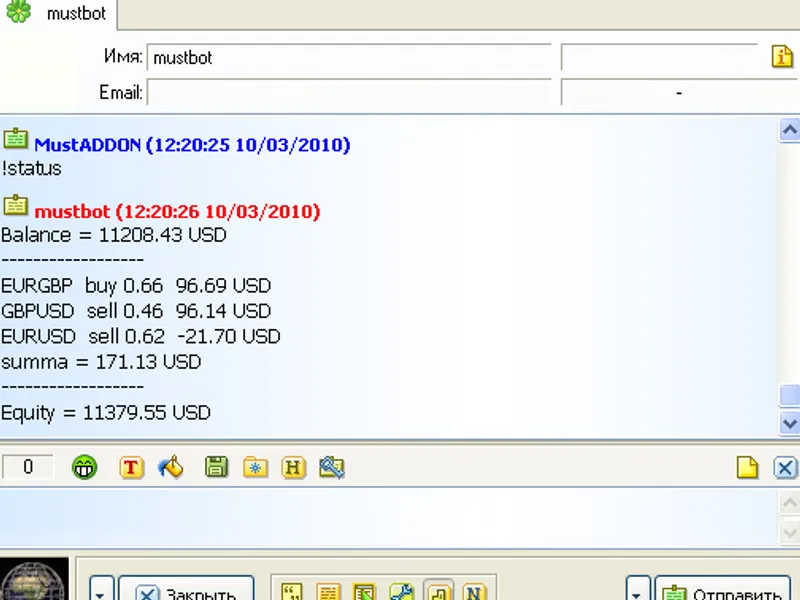
The icq messenger is a Expert Advisor for MetaTrader 5 that backgrounds / usage motivationusing the automated trading system, once in a while we may need to enquire information concerning account balance, opened positions, etc. , being far from a trading terminal, but having internet connection and icq on any computer (or any other device).
Usage
This tool is typically used for automated trading on major forex pairs and gold.
Platform
This Expert Advisor works exclusively on MetaTrader 5 (both build 600+ and newer versions).
Setup
Place the downloaded file in MQL5/Experts folder via File ? Open Data Folder in MetaTrader 5.
How to Install and Use icq messenger
1. Installation: Open the "File" menu, select "Open Data Folder," navigate to MQL/Experts, paste your file, and restart the terminal.
2. Activation: Drag the EA from the Navigator onto a chart, ensure "Allow live trading" is checked in the Common tab, and verify the AutoTrading button is green.
3. Optimization: Right-click your chart, choose "Expert List," click "Properties" to adjust inputs, and save your preferred setup as a set file for future use.
4. Maintenance: Regularly check the "Experts" tab in the terminal window to monitor trade logs and potential execution errors.
Frequently Asked Questions
Q: Why is my EA not opening trades? A: Check the "AutoTrading" button, ensure "Allow live trading" is enabled, and verify your broker allows automated trading on your account type.
Q: Can I run multiple EAs on one chart? A: No, each chart can only host one active EA; however, you can open multiple charts for different currency pairs to run several EAs.
Q: What does the "smiley face" icon mean? A: A smiley face in the top-right corner of the chart indicates the EA is successfully running; a frowny face means it is disabled.
What this tool does
backgrounds / usage motivationusing the automated trading system, once in a while we may need to enquire information concerning account balance, opened positions, etc.
Typical Use Case
This Expert Advisor excels in automated trading and technical analysis on MetaTrader 5.
Compatible Platform & Setup
This Expert Advisor works on MetaTrader 5. Place the file in the MQL5/Experts folder and restart the terminal.
Description & Settings
Related: pending tread ea (best for gold) - another powerful expert for MetaTrader 5 traders.
backgrounds / usage motivation
using the automated trading system, once in a while we may need to enquire information concerning account balance, opened positions, etc., being far from a trading terminal, but having internet connection and icq on any computer (or any other device). one does not have time nor desire to install and log in
Also recommended: vr rsi robot: multi-timeframe rsi trading strategy for metatrader 5 - similar expert with strong performance on MetaTrader 5.
metatrader
to get such a common information. so the idea of finding a way to get needed information concerning a trading account via icq has appeared.
implementation
i chose <
s
aving information in
txt
-file> ; <sending information on request> as a way to implement the idea.
i developed a common
mt
-advisor
exp_statusbot
for saving information. it saves information concerning account balance in
status
.
txt
and opened positions changes in
notify
.
txt
.
to send information from
txt
-files, i made the simplest
icqbot
mustwatcher
. it will analyze a request and send an answer to its author.
installation instructions
download and compile
exp_statusbot.
mq
4
.
launch
mt
and add
the advisor
to any chart.
download
icqbot
mustwatcher_v1.16.zip
.
launch the bot (please ensure that "microsoft .net framework 3.5" is installed on your computer)
using
add
button add needed
status
.
txt
and
notify
.
txt
(located in
<metatrader_dir>
\experts\files\statusbot
)
to the list
register
uin
for the bot (universal identification number, or flatly the icq number which can be obtained on the official web-site
)
enter
uin
of the bot and a password.
enter your name as an administrator.
click
connect
then send
command
!
status
(as the file is named
status
.
txt
) from your
uin
and get what we needed.
to enable automatic notifier of changed files (here
notify
.
txt
)
we shall enter
!
spamon
.
and after a corresponding change we receive what we subscribed to =)
the administrator can add other users to the registry, if they also need an access to this information.
this is just an example. needless to say that you can make as many
txt
files with any content as you wish and receive this content upon corresponding demand.
the list of all available commands appears by means of
!help
or can be seen in the file
<mustwatcher
_
dir
>\
data
\help_admin.txt
.
the bot's interface contains several buttons, so you won't be confused.
putting it in a nutshell, the one who needs it will grasp it.
the end.
updates
mustwatcher v1.05
automatic connection function when the program is launched is added.
mustwatcher v1.06
a checkbox of program automatic launch (when the operating system is launched) is added. it can be minimized to a tray.
mustwatcher v1.07
1) the list scheme for files necessary to be viewed and meant for automatic notification is changed. now before obtaining content of a text-file, you shall add it to the list (
watcher
tab) using
add
button. 2) feedback system which allows to write any text to a file is changed. now you can add your own commands (
feedback
tab) with any text and file record.
exp_statusbot.
mq
4
function that records data file, which shall be sent via email, is added.
exp_statusbot.
mq
5
function that records data file necessary for email report is added.
mustwatcher v1.08
function that generates a detailed report and sends it to stated email is added. in order to receive a report you shall add the data file to the corresponding list (
watcher
tab). a file name without a suffix is also a request command (for example, if you send command
!report
, the bot will generate a report on the basis of data from
report.txt
).
mustwatcher v1.10
bugfix.
mustwatcher v1.13
optimization. fixed errors.
mustwatcher v1.16
optimization. fixed errors.
You may also like: list positions - excellent alternative for expert users on MetaTrader 5.
Source Code
#property copyright "robotfx"
extern string statusfilename = "status.txt";
extern string spamfilename   = "notify.txt";
extern string reportfilename = "report.txt";
string expname = "statusbot";
int    ord_tickets[];
int    ord_tickets_past[];
int    ord_tickets_changing_open[];
int    ord_tickets_changing_close[];
double curbalance = 0.0;
.......
⚠ Limitations & Risk Warning
- This tool is provided for educational and testing purposes only.
- Past performance does not guarantee future results.
- Trading involves substantial risk of loss. Use on a demo account first.
- Results may vary depending on market conditions, broker, and settings.
- We recommend thorough backtesting and forward testing before using with real funds.