Script to Map Market Watch Symbols Based on Similarity
This tool for MetaTrader 5 is specifically engineered to streamline your trading operations. This script functions as a utility program designed for specific, one-time execution tasks. It is utilized to perform targeted actions, such as closing all open orders, managing chart objects, or executing custom administrative commands on demand.
How to Setup and Use Script to Map Market Watch Symbols Based on Similarity
1. Installation: Move your script file into the MQL/Scripts directory and restart the platform.
2. Execution: Drag the script onto a chart; it will perform a one-time action, such as closing all open orders or clearing chart objects.
3. Editing: Use MetaEditor (F4) to modify code, click "Compile," and verify no errors appear in the terminal before running.
4. Removing: Scripts stop automatically, but you can remove them manually by right-clicking the chart and choosing "Remove Script."
Frequently Asked Questions
Q: How are scripts different from EAs? A: Scripts execute a single action and then stop; EAs monitor the market and trade continuously.
Q: Can I assign a hotkey to a script? A: Yes, right-click the script in the Navigator, select "Set Hotkey," and define your preferred keyboard shortcut.
Q: Why did my script stop? A: Scripts are designed to stop immediately after finishing their programmed command; this is normal behavior.
Description & Settings
This script is a
reference solution
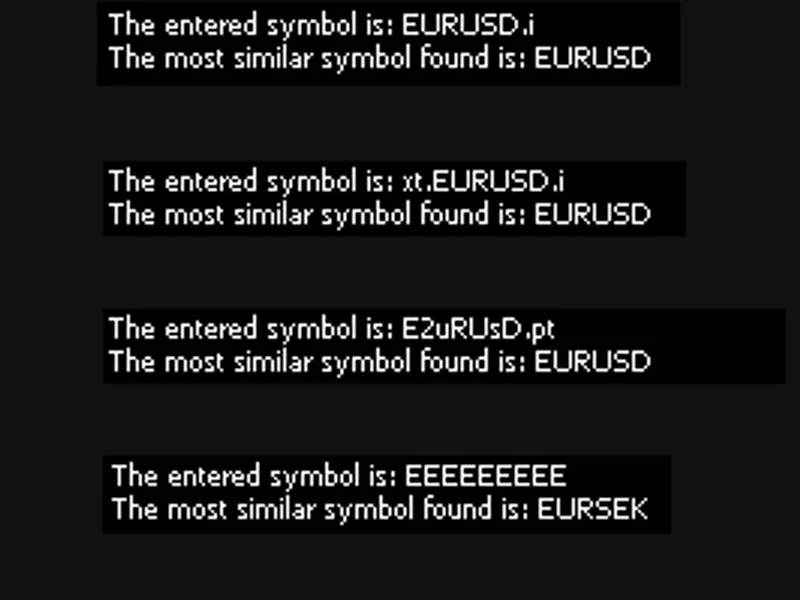
designed to help developers and MetaTrader 5 users solve a common problem: the mismatch between configured symbol names and the actual names provided by brokers.
As a developer, I have faced this challenge when working on configurable Expert Advisors (EAs), especially those that handle multi-symbol strategies. It is common for users to
not
adjust symbol names according to their broker's conventions, which causes EAs to malfunction. For example, if the EA configuration specifies "EURUSD," but the broker uses "EURUSD.i" or "EURUSD.m," the EA will not find the correct symbol and will fail to operate.
This code uses the
Levenshtein distance algorithm
to identify the most similar symbol to the one specified by the user among all those available in the Market Watch window.
Although I am not an expert, this solution has proven effective in my personal experience and can be a useful tool for other developers.
Main Applications and Uses:
Integration into configurable EAs:
This script is intended as a reference for integration into EAs or scripts that need to automatically adapt to the symbol names used by brokers.
Adaptability for custom broker symbols:
If a broker uses specific symbol names, this approach helps map them correctly and avoid configuration errors.
Configuration validation:
It can be used as a validation tool during development and testing phases to ensure that EAs are robust and adaptable.
Education and learning:
For those learning MQL5, this code demonstrates how to work with arrays, strings, and dynamic functions like calculating string distances. Important Warning:
This code is based on my personal experience and is a solution that has worked for my projects. However:
I am not an expert
in MQL5, and this solution may not be the most efficient or ideal for all cases.
There might be more advanced or specific approaches depending on the needs of each user or project.
I encourage users and developers to experiment with the code, adapt it to their own contexts, and, if necessary, explore other alternatives that might be more suitable.
Practical Integration Example:
Suppose you have developed an EA that operates with "EURUSD." In the user's environment, the broker has this symbol as "EURUSD.i." By integrating this code into the EA:
The user can enter "EURUSD" as the base configuration.
The code will automatically search Market Watch and map the correct symbol ("EURUSD.i").
The EA will operate seamlessly, eliminating the need for precise manual configurations. Conclusion:
This script is not only useful for ensuring the functionality of EAs in different environments but also serves as a starting point for developing more advanced solutions.
While there are other ways to address this issue, I hope this implementation proves to be a valuable tool for other developers and MetaTrader 5 users.