Dominance EA
This software component for MetaTrader 5 is built to enhance the capabilities of your trading environment. This Expert Advisor serves as automated trading software. It is utilized to monitor financial markets and execute trades based on predefined algorithmic rules, enabling precise position management without the need for constant manual oversight.
How to Setup and Use Dominance EA
1. Installation: Open the "File" menu, select "Open Data Folder," navigate to MQL/Experts, paste your file, and restart the terminal.
2. Activation: Drag the EA from the Navigator onto a chart, ensure "Allow live trading" is checked in the Common tab, and verify the AutoTrading button is green.
3. Optimization: Right-click your chart, choose "Expert List," click "Properties" to adjust inputs, and save your preferred setup as a set file for future use.
4. Maintenance: Regularly check the "Experts" tab in the terminal window to monitor trade logs and potential execution errors.
Frequently Asked Questions
Q: Why is my EA not opening trades? A: Check the "AutoTrading" button, ensure "Allow live trading" is enabled, and verify your broker allows automated trading on your account type.
Q: Can I run multiple EAs on one chart? A: No, each chart can only host one active EA; however, you can open multiple charts for different currency pairs to run several EAs.
Q: What does the "smiley face" icon mean? A: A smiley face in the top-right corner of the chart indicates the EA is successfully running; a frowny face means it is disabled.
Description & Settings
Dominance EA
At its core,
Dominance EA
is a minimalist, bias-driven trading system built around a simple but powerful idea:
market dominance
. Rather than reacting to every tick or micro-pattern, the EA steps back and evaluates which side of the market—buyers or sellers—controlled the previous trading day, then aligns its next action with that dominant force.
The system operates on a once-per-day execution model
,
triggered strictly at the start of a new trading day (excluding Mondays to avoid weekend-induced volatility). This design eliminates noise and enforces a disciplined, session-based decision cycle.
Core Concept — Dominance
The EA defines dominance using two complementary layers:
Structural Dominance (Bar Count)
It iterates through all candles formed during the previous day.
Counts:
Bullish candles (close > open)
Bearish candles (close < open)
The side with the higher count establishes
directional control
.
Contextual Confirmation (MA Positioning)
The final candle of the previous day is evaluated against a Moving Average.
This acts as a
filter
, ensuring that dominance is not just numerical, but also structurally aligned with trend positioning.
Only when both conditions agree does the EA establish a valid bias:
Buy Bias
→ Bullish dominance + close above MA
Sell Bias
→ Bearish dominance + close below MA
Execution Logic
Once a valid daily bias is established:
The EA checks for
existing positions
(ensuring one-trade-per-symbol discipline).
If no trade is open, it executes
a single position per day
in the direction of the bias.
This creates a clean operational cycle:
Analyze yesterday → Decide today → Execute once → Stand down
Risk & Trade Management
The EA adopts a
conservative and broker-compliant execution model
:
Minimum Volume Trading
Trades are placed using SYMBOL_VOLUME_MIN , ensuring compatibility across brokers and reducing risk exposure.
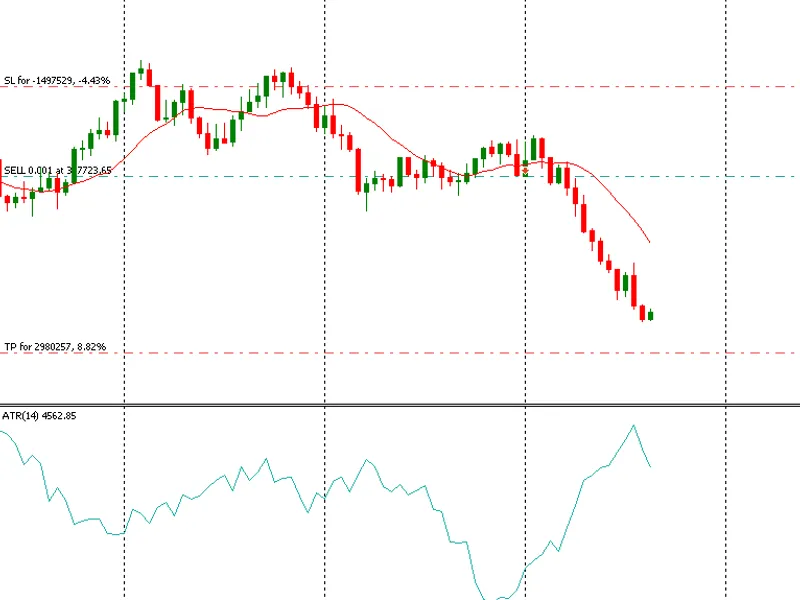
ATR-Based Stop Loss
Stop Loss is dynamically calculated using:
Previous day’s high/low
Expanded by an ATR multiple ( atrMultiplier )
This ensures volatility-adjusted protection rather than fixed pip distances.
Risk-to-Reward Structure
Take Profit is set at
2× the Stop Loss distance
, enforcing a consistent reward profile.
Pre-Trade Validation
Stop level compliance (broker constraints)
Margin availability checks
Tick-level price validation
Key Inputs
The EA exposes a concise but powerful configuration surface:
Model Behavior
eaMode → Normal or Inverted logic
Trend Filter
maPeriod , maMethod , maAppPrice
Volatility & Risk
atrPeriod , atrMultiplier
Execution Controls
ordFillType → Order filling policy
eaMagic → Trade identification
tradeComment → Logging & traceability
These inputs allow both
strategic flexibility
and
execution control
without overcomplicating the system.
What You’ll Learn
This EA goes beyond strategy—it’s a practical lesson in
engineering disciplined trading systems in MQL5
:
How to design a
time-filtered trading model
(daily bias systems)
Structuring logic around
market state instead of tick noise
Using
indicator handles (MA, ATR)
efficiently
Implementing
safe trade execution pipelines
with margin and stop validations
Designing
modular, maintainable code
using structs and functional separation
Enforcing
one-trade-per-cycle logic
for cleaner backtesting and analysis
Final Insight
Dominance EA is intentionally simple in appearance but deliberate in design. It strips trading down to a single question: