
coensio trader1 v06
Info
The coensio trader1 v06 is a Expert Advisor for MetaTrader 5 that coensiotrader1 is an open, free, community-supported, automatic trading system (ats), that is mainly based on only two basic, but very powerful market principles: market trends and market price action. this system rests on a "trend hunting" principle and enters a trade only when several market conditions are met.
Usage
This tool is typically used for automated trading on major forex pairs and gold.
Platform
This Expert Advisor works exclusively on MetaTrader 5 (both build 600+ and newer versions).
Setup
Place the downloaded file in MQL5/Experts folder via File ? Open Data Folder in MetaTrader 5.
How to Install and Use coensio trader1 v06
1. Installation: Open the "File" menu, select "Open Data Folder," navigate to MQL/Experts, paste your file, and restart the terminal.
2. Activation: Drag the EA from the Navigator onto a chart, ensure "Allow live trading" is checked in the Common tab, and verify the AutoTrading button is green.
3. Optimization: Right-click your chart, choose "Expert List," click "Properties" to adjust inputs, and save your preferred setup as a set file for future use.
4. Maintenance: Regularly check the "Experts" tab in the terminal window to monitor trade logs and potential execution errors.
Frequently Asked Questions
Q: Why is my EA not opening trades? A: Check the "AutoTrading" button, ensure "Allow live trading" is enabled, and verify your broker allows automated trading on your account type.
Q: Can I run multiple EAs on one chart? A: No, each chart can only host one active EA; however, you can open multiple charts for different currency pairs to run several EAs.
Q: What does the "smiley face" icon mean? A: A smiley face in the top-right corner of the chart indicates the EA is successfully running; a frowny face means it is disabled.
What this tool does
coensiotrader1 is an open, free, community-supported, automatic trading system (ats), that is mainly based on only two basic, but very powerful market principles: market trends and market price action.
Typical Use Case
This Expert Advisor excels in automated trading and technical analysis on MetaTrader 5.
Compatible Platform & Setup
This Expert Advisor works on MetaTrader 5. Place the file in the MQL5/Experts folder and restart the terminal.
Description & Settings
Related: display open positions total stoploss and takeprofit value mt5 - another powerful expert for MetaTrader 5 traders.
Also recommended: double up с изгибом - similar expert with strong performance on MetaTrader 5.
coensiotrader1 is an open, free, community-supported, automatic trading system (ats), that is mainly based on only two basic, but very powerful market principles: market trends and market price action.this system rests on a "trend hunting" principle and enters a trade only when several market conditions are met. the trend detection is based on daily double exponential moving average indicator.
the extended statistical investigation showed that, market can be considered as "trending" if only three successive daily dema values point in the same direction. in case when a trending condition is detected, system tries to find the best entry point in the direction of the current trend. the entry points are based on the indicator and swing-low/swing-high price action, as described below.
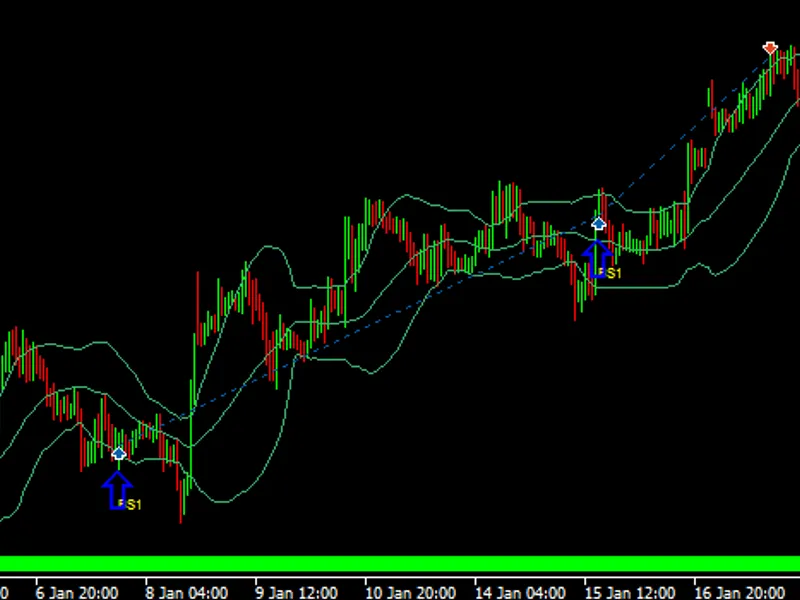
buy signals
the system enters a buy trade every time when:
market is in "bullish" up trending condition;
price comes from below the lower bollinger band;
a "swing low" price action is detected: low -> lower low -> higher low.
fig.1. example of buy entry
sell signals
the system enters a sell trade every time when:
market is in "bearish " down trending condition;
price comes from above the upper bollinger band;
a "swing high" price action is detected: high -> higher high -> lower high.
fig.2. example of sell entry
the system is written in mql5 programming language, that provides a possibility of performing an accurate and realistic back-test analysis of a multi-currency based trading systems.
the key to successful back test of a multi-currency system is to abandon the "tick based" ea flow control and use a "timer based" one. this prevents from stagnation in case the ea's base currency does not receives price ticks any more e.g.: during the "quiet" market hours. moreover the systems has a healthy risk/reward ratio and uses a trailing "stoploss" mechanism with configurable trailing step (using trailingstoplossstep parameter).
the lot size can be set to a fixed size (using lotsize parameter), a proportional lot size (using riskmax, which is based on stoploss level and equity risk in %), or a dynamic lot size (using lotbalancedivider parameter, which resizes the lot size according to change of account balance). besides that, the system incorporates two different "takeprofit" actions: a standard level based "takeprofit" and additionally an equity based "takeprofit" action. in multi-currency trading systems the account equity can significantly rise above the account balance, this fact gives an opportunity to close all trades and take the current profit as it is. this smart behavior dramatically increases the system's profitability.
as already stated above, coensiotrader1 is a free and open project, however all coensiotrader1 project members should actively contribute to the future system improvement.
to make this possible, the system is designed in such way that it is capable of harnessing the computing power of all project members. so every time a project member performs a system optimization, the results are validated and in case of interesting outcome, the optimization parameters are automatically uploaded to the coensio server database and directly shared with other project members.
the most gainful results are selected using "coensioindex" which is defined by:
coensioindex = profitfactor * balancegrowth[%] / equitydrawdown[%]2
where balancegrowth[%] = 100 * profit / initialdeposit
the results:
fig.3. example of a backtest result (rank=10)
more trading parameters are available on:
You may also like: exp jfatl digit system - excellent alternative for expert users on MetaTrader 5.
Source Code
#property copyright "robotfx"
#property link "https://robotfx.org"
#include "coensiotrader1v06.mqh"
#include <trade\trade.mqh>
#include <chartobjects\chartobjectstxtcontrols.mqh>
#import "wininet.dll"
int internetattemptconnect(int x);
int internetopenw(string sagent,int laccesstype,
                  string sproxyname="",string sproxybypass="",
                  int lflags=0);
.......
⚠ Limitations & Risk Warning
- This tool is provided for educational and testing purposes only.
- Past performance does not guarantee future results.
- Trading involves substantial risk of loss. Use on a demo account first.
- Results may vary depending on market conditions, broker, and settings.
- We recommend thorough backtesting and forward testing before using with real funds.