Fractal CC I FIlter
This software component for MetaTrader 5 is built to enhance the capabilities of your trading environment. This technical indicator acts as a specialized analysis tool designed to visualize market data. It helps traders identify emerging trends, momentum shifts, and key support or resistance levels by plotting statistical calculations directly onto price charts.
How to Setup and Use Fractal CC I FIlter
1. Installation: Place your file in the MQL/Indicators folder via "Open Data Folder" and restart your terminal.
2. Loading: Find the indicator in the Navigator, drag it onto your chart, and configure the input parameters in the popup window.
3. Customization: Press Ctrl+I to open the indicator list, select your tool, and click "Properties" to change colors, levels, or visual styles.
4. Updating: Replace the old file in the Indicators folder with the new version and restart the platform to apply changes.
Frequently Asked Questions
Q: Why is my indicator not showing? A: Verify the file is in the MQL/Indicators folder, or try right-clicking the "Indicators" tree in the Navigator and clicking "Refresh."
Q: Do custom indicators slow down the platform? A: Too many complex indicators can impact performance; remove unused ones via the "Indicator List" (Ctrl+I).
Q: Can I use MT4 indicators on MT5? A: No, MQL4 and MQL5 are distinct languages; ensure the indicator is compiled specifically for your platform version.
Description & Settings
Fractal with CCI Filter
Description
Main Features
CCI Smart Filter
: Fractal signals are only displayed when the CCI reaches extreme levels, confirming the strength of the movement
Timing accuracy
: Uses the CCI value exactly on the signal candle, not on the confirmation candle
Flexible configuration
: CCI period and filtering threshold are fully configurable
Clear visualisation
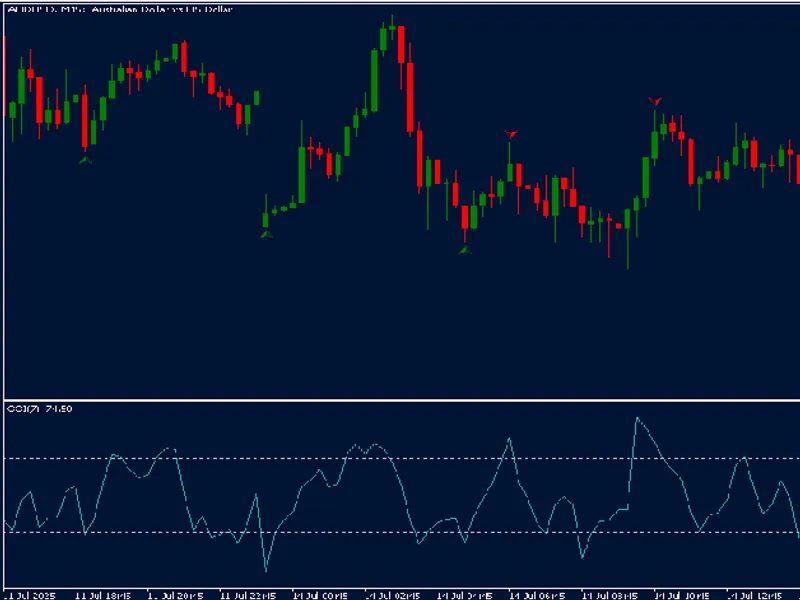
: Red arrows above candles for sell signals, green arrows below for buy signals
Works on all timeframes
: Adapted to work correctly in both real mode and Strategy Tester
How to Use
Sell Signals
: When a red arrow appears above the candle, it indicates a confirmed bullish fractal with CCI above the threshold.
Buy Signals
: When a green arrow appears below the candle, it indicates a confirmed bearish fractal with CCI below the negative threshold.
Confirmation
: For greater reliability, wait for the confirmation candle to close before entering the trade.
Inputs
-
CCI_Period
: CCI period (default: 7) - adjust according to your strategy -
CCI_Threshold
: CCI threshold for filtering fractals (default: 110) - increase for rarer and more reliable signals
Usage Tips
- For reversal operations: Use CCI_Threshold = 100-110 - For trend trading: Combine with a long-term moving average - In very volatile markets: Increase CCI_Threshold to reduce false signals - In sideways markets: Decrease CCI_Period for greater sensitivity
Observations
- This indicator does not repaint - signals are confirmed after the necessary candles close - Signals are plotted exactly on the candle where the fractal occurs, with the CCI checked on the same candle - Based on the correct mathematical logic of fractal detection (5 candles for confirmation) This indicator is the result of collaborative work between Joy and Qwen, enhancing the traditional fractal approach with a statistically significant CCI filter.