XAU U S D Spread Alert Utility MT5
This is a powerful addition to your MetaTrader 5 toolkit designed to optimize market analysis and performance. This technical indicator acts as a specialized analysis tool designed to visualize market data. It helps traders identify emerging trends, momentum shifts, and key support or resistance levels by plotting statistical calculations directly onto price charts.
How to Setup and Use XAU U S D Spread Alert Utility MT5
1. Installation: Place your file in the MQL/Indicators folder via "Open Data Folder" and restart your terminal.
2. Loading: Find the indicator in the Navigator, drag it onto your chart, and configure the input parameters in the popup window.
3. Customization: Press Ctrl+I to open the indicator list, select your tool, and click "Properties" to change colors, levels, or visual styles.
4. Updating: Replace the old file in the Indicators folder with the new version and restart the platform to apply changes.
Frequently Asked Questions
Q: Why is my indicator not showing? A: Verify the file is in the MQL/Indicators folder, or try right-clicking the "Indicators" tree in the Navigator and clicking "Refresh."
Q: Do custom indicators slow down the platform? A: Too many complex indicators can impact performance; remove unused ones via the "Indicator List" (Ctrl+I).
Q: Can I use MT4 indicators on MT5? A: No, MQL4 and MQL5 are distinct languages; ensure the indicator is compiled specifically for your platform version.
Description & Settings
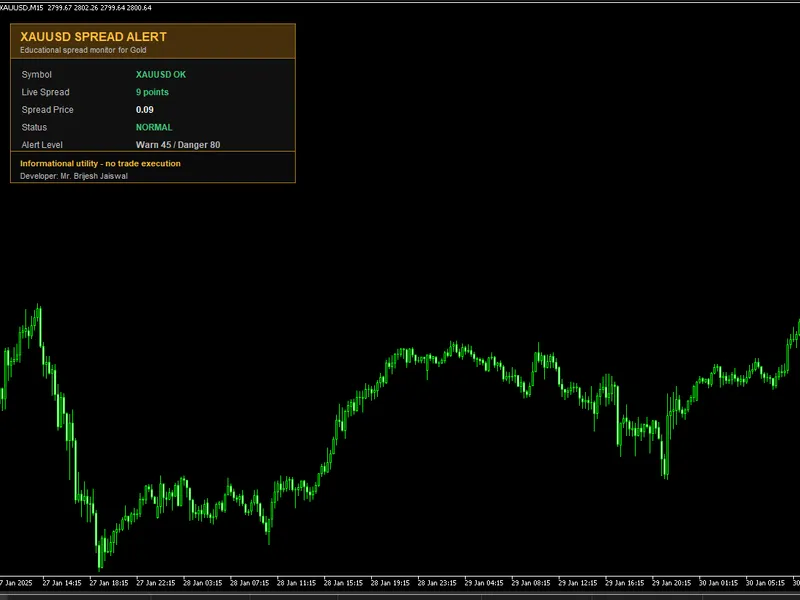
XAUUSD Spread Alert Utility MT5 is a simple educational indicator for MetaTrader 5. It displays the current broker spread directly on the chart and can notify the trader when the spread moves above selected warning or danger thresholds. The idea behind this tool is that spread is an important trading cost, especially on instruments such as XAUUSD where market conditions can change quickly around session opens, rollovers, news periods and low-liquidity moments. By watching spread directly on the chart, traders can learn how execution conditions change during different parts of the trading day. This utility is informational only. It does not open trades, close trades, manage positions or provide entry signals. Main Features: - On-chart XAUUSD spread monitor - Live spread display in points - Spread price display - Normal, warning and danger status labels - User-defined warning spread threshold - User-defined danger spread threshold - Popup alert option - Sound alert option - Push notification option - Alert cooldown to reduce repeated notifications - Manual spread test mode for Strategy Tester checking - Three visual themes - Developer name shown on chart - No trade execution How To Use: Attach the indicator to an XAUUSD or Gold chart in MetaTrader 5. The panel will display the current spread reported by the broker. If the spread is below the warning level, the panel shows a normal condition. If spread reaches or exceeds the warning level, the panel changes to warning status. If spread reaches or exceeds the danger level, the panel changes to danger status. Panel Interpretation: - Symbol shows whether the current chart appears to be XAUUSD or Gold. - Live Spread shows the broker-reported spread in points. - Spread Price converts the spread points into price distance. - Status shows NORMAL, WARNING or DANGER according to the configured thresholds. - Thresholds shows the warning and danger levels currently used by the indicator. - Last Alert shows the latest alert condition detected by the indicator. This is useful in Strategy Tester because terminal alert windows and notification channels may not behave the same way as they do on a live chart. Input Parameters: - Panel title: text shown in the panel header. - Panel corner: chart corner where the panel is displayed. - X and Y position: pixel offset for panel placement. - Theme: visual color theme. - Refresh seconds: timer refresh interval. - Warning spread points: spread level where warning status begins. - Danger spread points: spread level where danger status begins. - Alert cooldown seconds: minimum time between repeated alerts. - Popup alert: enable or disable terminal popup alerts. - Sound alert: enable or disable terminal sound alerts. - Sound file: sound file from the MetaTrader terminal Sounds folder. - Push notification: enable or disable mobile push alerts if configured in the terminal. - Show developer name: show or hide the developer name on the chart panel. - Tester manual mode: in Strategy Tester, use a manual spread value instead of broker-reported spread. - Tester spread points: manual spread value used when tester manual mode is enabled. Notes: This indicator is intended as a free educational spread monitoring utility. It is not financial advice, it does not predict future price movement and it does not execute trades. Contact us for any support:
You May Also Like
RobotFX does not own any of the code provided on this platform. All tools are freely available on the internet; we simply index and re-offer them for download. We are not responsible for any financial losses that may occur. Trading responsibilities rely solely on the traders downloading and using the displayed Expert Advisors, indicators, and scripts. These tools are provided for educational purposes only and may require modification or optimization to align with a trader's specific strategy or needs.
© ROBOTFX - Best MetaTrader Expert Advisors & Indicators