Zig Zag Indicator with Extra Features
This software component for MetaTrader 4 is built to enhance the capabilities of your trading environment. This technical indicator acts as a specialized analysis tool designed to visualize market data. It helps traders identify emerging trends, momentum shifts, and key support or resistance levels by plotting statistical calculations directly onto price charts.
How to Setup and Use Zig Zag Indicator with Extra Features
1. Installation: Place your file in the MQL/Indicators folder via "Open Data Folder" and restart your terminal.
2. Loading: Find the indicator in the Navigator, drag it onto your chart, and configure the input parameters in the popup window.
3. Customization: Press Ctrl+I to open the indicator list, select your tool, and click "Properties" to change colors, levels, or visual styles.
4. Updating: Replace the old file in the Indicators folder with the new version and restart the platform to apply changes.
Frequently Asked Questions
Q: Why is my indicator not showing? A: Verify the file is in the MQL/Indicators folder, or try right-clicking the "Indicators" tree in the Navigator and clicking "Refresh."
Q: Do custom indicators slow down the platform? A: Too many complex indicators can impact performance; remove unused ones via the "Indicator List" (Ctrl+I).
Q: Can I use MT4 indicators on MT5? A: No, MQL4 and MQL5 are distinct languages; ensure the indicator is compiled specifically for your platform version.
Description & Settings
Taking a Closer Look at the Workings of the ZigZag Indicator
The
ZigZag Indicator
is one on those indicators, that at a misleading first glans, seems to be the "Holy Grail" of all indicators for finding the
Tops and Bottoms
for set-ups like Swing or Trend Following strategies. Quite often, newcomers tend to be totally amazed by it, believing that with it, they cannot go wrong. In reality however, nothing could be further from the truth, mainly because it does something called "repainting". In other words, during a live progression of price action changes, the indicator changes the most recent Top or Bottom in order to reflect the new price data. By the time the ZigZag Top or Bottom has settled in and establish itself on the indicator, the current situation of the market has long changed and is no longer congruent with the point that was initially indicated as being a Top or a Bottom of the prices.
This, however, does not mean that this indicator is worthless! On the contrary, it can be used quite effectively for analysing past data and creating very good setups for many a strategy - just not in the way most newcomers believe it to be. Now, there are many ways that this indicator is used effectively, and I invite commenters here, to share their ideas about how to effectively use it in their strategies, but that is however, not the main objective of this article.
I set out to take the original
ZigZag
code by
Metaquotes
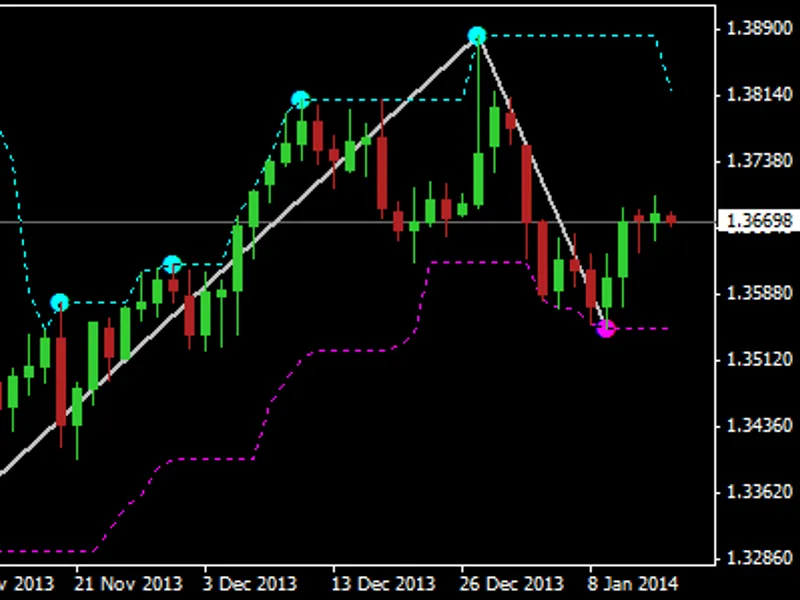
, and to rewrite it in a more easily readable form (at least for me), but most importantly, to visually display many of its internal workings which usually are not visible with the original indicator (see images below). Here is the list of the "extra features" which my rendition of this indicator, namely "
ZigZagExtras
" will display:
Lines graphs are displayed showing the
Highest Highs
and
Lowest Lows
for the
"Depth" period
, one of parameters of the original indicator.
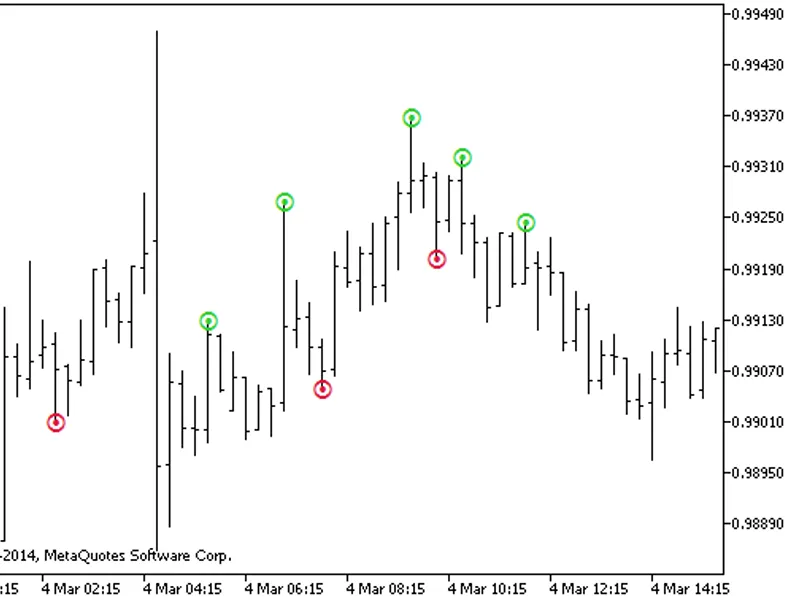
Besides the current and finalised Top and Bottom points used in the ZigZag pattern, it also displays the past points that were considered as strong candidates that at a point were considered a valid Top or Bottom for the ZigZag pattern. These are displayed as little fully filled circles at Highs ("●") and Lows ("●").
Optionally
, the indicator can also display all
BreakOut points
, breaking above Highs ("○") or below Lows ("○") of the "Depth" period, that were also considered as potential tops and bottoms in the internal workings of the ZigZag indicator. It is usually these that are most often "repainted" as current prices evolve and that newcomers erroneously consider as a valid current top or bottom with disastrous results for their egos and account balance.
The main purpose of the code and the extra visual cues, serves the purpose, of not only better understanding the workings of this indicator, but also as possible signals that could be used in many a strategy that you may wish. They could be useful for quick scalping in Breakouts or as pre-signals prior to retracements or others which have not even occurred to me yet. I am sure that many of you will come up with many ideas and hopefully will be willing to share them here with all that read this.
Instructions:
Just attach the indicator to a Chart and set the parameters as you would for the original ZigZag indicator. Please note however, that the order of the parameters is different and that the
Depth
and
BackStep
were placed together as they are Bar Periods or Counts. Also, the
Deviation
parameter also caters for decimal fractions of a PIP (in the case of 3/5 digit brokers). Optionally set the boolean flag to also
Show BreakOut Points
on the graph.
You can also enable an
Alert to be Triggered on BreakOuts
of
Highs
and
Lows
. The Alert text is configurable so that it can be presented in your own language or words.
Please let me know if you find any bugs or have any suggestions or "features" that you would like to have incorporated in future releases.
v1.5:
Added compiler directive for strict compilation mode.
v1.4:
Bug fix of a sporadic "array out of range" error.
v1.3:
Allows the Alerts to be used, even if NOT displaying the BreakOuts.
v1.2:
Displays the Symbol and Time Frame (Period) in Alert messages, facilitating its use on multiple charts simultaneously.
v1.1:
Allows an Alert to be set on BreakOuts of Highs or Lows. There was also a bug fixed that prevented the indicator from updating on fresh tick data.
Example Views of the indicator (without and with the optional BreakOut points):
Please note, that all my CodeBase publications' source code are now also available in "Public Projects" tab of MetaEditor under the name "FMIC".