A class for working with free form buttons
This professional-grade solution for MetaTrader 5 helps traders achieve greater efficiency in their daily workflow. This library provides a collection of modular, reusable code. It is utilized by developers to organize common functions, allowing for the integration of complex logic across multiple Expert Advisors, indicators, or scripts without the need for code duplication.
How to Setup and Use A class for working with free form buttons
1. Storage: Place library files in the MQL/Libraries directory to ensure they are accessible to your projects.
2. Implementation: Include the library in your code using the #import directive, ensuring you match the exact function names and parameters.
3. Compilation: Ensure the library is present in the directory before you compile your main EA or script, as the compiler links them during this phase.
4. Management: Keep libraries organized in sub-folders if you manage many custom functions to maintain a clean project structure.
Frequently Asked Questions
Q: What is a library file used for? A: Libraries store reusable code modules, allowing you to centralize common logic used by multiple EAs or indicators.
Q: Is a library executable? A: No, libraries are non-executable files containing functions; they must be imported into an EA, indicator, or script to function.
Q: Can I update a library while the platform is running? A: You should compile your EA or script after updating a library to ensure the latest code changes are integrated.
Description & Settings
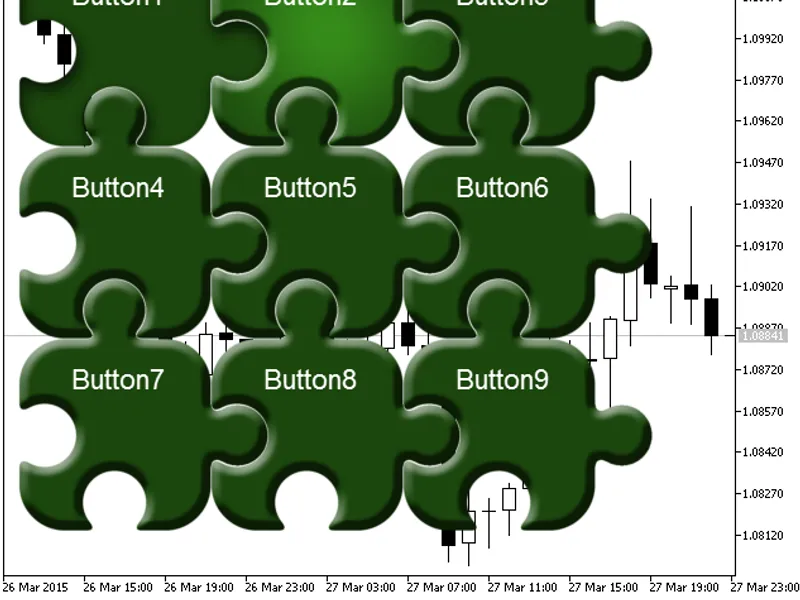
This class is designed for creating interactive buttons with various states on a price chart.
It has been developed for a arranged by generous. Thank you.
A demonstration of the CBtn class
Class methods
Create(long chart_id,int sub_wnd,string name,int x,int y,int dx,int dy)
- create a button with parameters:
Window identifier
Subwindow number
Button name
X coordinate
Y coordinate
Horizontal size
Vertical size
Resources(string img_up,string img_up_active="",string img_dn="",string img_dn_active="",string img_up_disable="",string img_dn_disable="",string img_mask="")
- define the images for different button states:
Normal unpressed button
Button hovered by cursor
Pressed button
Pressed button hovered by cursor
Disabled button
Button outline mask
SetUseMask(ENUM_USEMASK mask,int x=0,int y=0)
- set the mask by the color of the specified pixel; the mask is formed from the standard unpressed button image.
Used mask type
X coordinate
Y coordinate
SetUseMask(ENUM_USEMASK mask,uint acolor)
- set the mask by color; the mask is formed from the normal unpressed button image.
Used mask type
Color
SetCorner(ENUM_BASE_CORNER corner)
- set the corner of the chart which the button is anchored to
SetAnchor(ENUM_ANCHOR_POINT anchor)
- set the anchor type
SetX(int x)
- set the X coordinate
SetY(int y)
- set the Y coordinate
SetXY(int x,int y)
- single method for setting the X and Y coordinates
On(bool state)
- set the button status (true for pressed, false for unpressed)
Enable(bool state)
- enable/disable the button
Paint(void)
- draw the button
Event(int id,long lparam,double dparam,string sparam)
- pass events to the buttonall parameters are duplicated from the OnChartEvent function
GetX(void)
- get the X coordinate
GetY(void)
- get the Y coordinate
GetEnable(void)
- get the enabled/disabled status
GetOn(void)
- get the pressed/unpressed status
GetCorner(void)
- get the corner of a chart which the button is anchored to
GetAnchor(void)
- get the anchor type
AddText(int x,int y,string font_name,int font_size,color text_color,string text)
- add text to the button
X coordinate
Y coordinate
Font name
Font size
Text color
Text
Text(string text) -
update the button text (doesn't work without
AddText(...)
call)
Creating a button
By default, a button has following parameters:
Unpressed
Enabled
Anchored to upper left corner of the chart
Anchored by upper left corner of the button
Setting the button mask
By default, the button is created from the normal unpressed button image. Transparent pixels serve as a mask.
UseMask(MASK_STANDALONE_RESOURCE) - the mask uses an image specified in Resources(). If the image is not set, the entire button area (rectangle) will be used as a working area.
UseMask(MASK_PIXEL,x,y) - the mask uses the color of the specified pixel. If the pixel color doesn't match the specified color, it becomes the mask. If the coordinate are not set, then use [0,0] coordinates.
UseMask(MASK_COLOR,color) - specified color is used for the mask. If the pixel color doesn't match the specified color, it becomes the mask. The color should be set in ARGB format.
Example