Download ALL MT4 indicators (1640)

Similar MetaTrader Tools









harmonik manual
Info
The harmonik manual is a Indicator for MetaTrader 4 that this indicator will show the name of the pattern by placing point xabcd manually and also will search the next potential reversal zone (prz) automatically. this idea was first published by snorm as davinciskiss indicator.
Usage
This tool is typically used for enhancing chart analysis and decision making.
Platform
This Indicator works exclusively on MetaTrader 4 (both build 600+ and newer versions).
Setup
Place the downloaded file in MQL4/Indicators folder via File ? Open Data Folder in MetaTrader 4.
How to Install and Use harmonik manual
1. Installation: Place your file in the MQL/Indicators folder via "Open Data Folder" and restart your terminal.
2. Loading: Find the indicator in the Navigator, drag it onto your chart, and configure the input parameters in the popup window.
3. Customization: Press Ctrl+I to open the indicator list, select your tool, and click "Properties" to change colors, levels, or visual styles.
4. Updating: Replace the old file in the Indicators folder with the new version and restart the platform to apply changes.
Frequently Asked Questions
Q: Why is my indicator not showing? A: Verify the file is in the MQL/Indicators folder, or try right-clicking the "Indicators" tree in the Navigator and clicking "Refresh."
Q: Do custom indicators slow down the platform? A: Too many complex indicators can impact performance; remove unused ones via the "Indicator List" (Ctrl+I).
Q: Can I use MT4 indicators on MT5? A: No, MQL4 and MQL5 are distinct languages; ensure the indicator is compiled specifically for your platform version.
What this tool does
this indicator will show the name of the pattern by placing point xabcd manually and also will search the next potential reversal zone (prz) automatically.
Typical Use Case
This Indicator excels in automated trading and technical analysis on MetaTrader 4.
Compatible Platform & Setup
This Indicator works on MetaTrader 4. Place the file in the MQL4/Indicators folder and restart the terminal.
Description & Settings
Related: harmonik manual new version - another powerful indicator for MetaTrader 4 traders.
this indicator will show the name of the pattern by placing point xabcd manually and also will search the next potential reversal zone (prz) automatically.
Also recommended: modified assistant for selecting the manual strategy - similar indicator with strong performance on MetaTrader 4.
this idea was first published by snorm as davinciskiss indicator. i have modified harmonic ratios.mq4 by alltraders, and added more command that needed.i have made improvements to this indicator, so it will look as figure below:
i have added some feature as seen on the right side of the chart.
by clicking the button feature, you can set the utility as follows:
"search" will find all the possible patterns that will happen next.
"next" will move the point "d" on the pattern obtained, to know the name.
"on / off" to turn the indicator on or off.
"colour / none" to change the color of the harmonic pattern, which is colored or not.
"xabc" to put the point xabc to the nearest highest or lowest point.
"reset" when an error occurs that is not yet defined, press this button.
"auto" is upcoming features that i have not thought.
to move the location of the menu, press the key "m" for a while. after the key "m" is released, click the mouse button on the desired area.
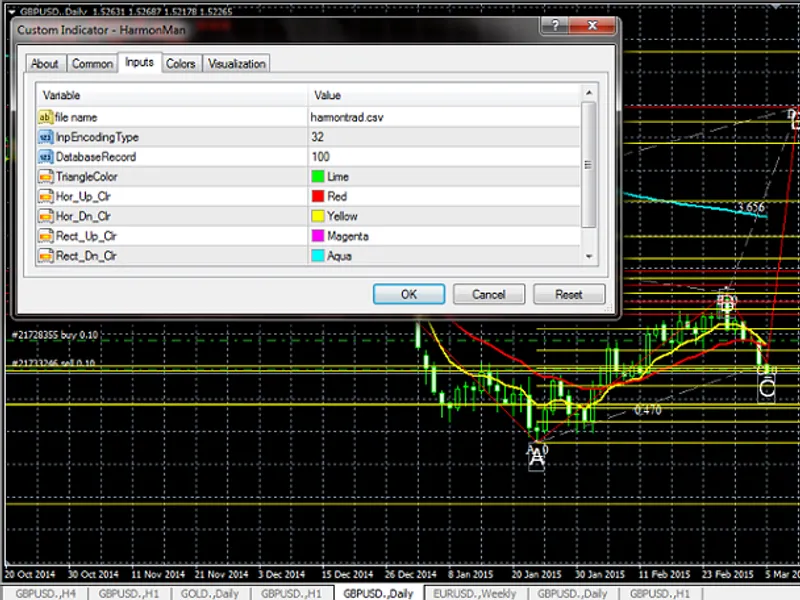
you also be able to use your own harmonics pattern database. just change the input "file name" and the number of "databaserecord" in the inputs tab (see figure above). you do not have to worry that the number inputted into "databaserecord" is not appropriate, because the indicator will adjust if a given number is too large. and will only read the database records, according to the inputted number, if the number entered is too small. save your database file at <mql4>files.
the data above is harmonic pattern database, and must be saved as harmontrad.csv and placing the file at terminal_data_folder\mql4\files.
after indicator loaded, placing xabcd to any point, and at the left panel will show the name of the pattern, if the pattern found, otherwise will show comparison of ab to cd.
if we want to search the next prz that may occur, placing text d at the right of the last candle (time[0]), if text d above the text c, indicator will search prz to upper direction, and vice versa.
put text and name it with on, and insert the amount of prz that we want to search.
figure below show the result:
we can add much more pattern at harmontrad csv, but you need to change the number of database record at line 622 as shown at the figure below:
if point d disappear to nowhere, simply press ctrl+b and delete the text, name d and on, as shown at figure below:
and the new text d will formed.
You may also like: gimmebar indicator suite - excellent alternative for indicator users on MetaTrader 4.
Source Code
#property copyright "robotfx"
#property link "https://robotfx.org"
#property version   "1.00"
#property strict
#property indicator_chart_window
input string inpfilename="harmontrad.csv";    // file name
input int    inpencodingtype=file_ansi;
input int    databaserecord=84;
input color  trianglecolor=clrlime;
input color  hor_up_clr=clrred;
.......
⚠ Limitations & Risk Warning
- This tool is provided for educational and testing purposes only.
- Past performance does not guarantee future results.
- Trading involves substantial risk of loss. Use on a demo account first.
- Results may vary depending on market conditions, broker, and settings.
- We recommend thorough backtesting and forward testing before using with real funds.