Accelerator Oscillator (AC)
This tool for MetaTrader 5 is specifically engineered to streamline your trading operations. This technical indicator acts as a specialized analysis tool designed to visualize market data. It helps traders identify emerging trends, momentum shifts, and key support or resistance levels by plotting statistical calculations directly onto price charts.
How to Setup and Use Accelerator Oscillator (AC)
1. Installation: Place your file in the MQL/Indicators folder via "Open Data Folder" and restart your terminal.
2. Loading: Find the indicator in the Navigator, drag it onto your chart, and configure the input parameters in the popup window.
3. Customization: Press Ctrl+I to open the indicator list, select your tool, and click "Properties" to change colors, levels, or visual styles.
4. Updating: Replace the old file in the Indicators folder with the new version and restart the platform to apply changes.
Frequently Asked Questions
Q: Why is my indicator not showing? A: Verify the file is in the MQL/Indicators folder, or try right-clicking the "Indicators" tree in the Navigator and clicking "Refresh."
Q: Do custom indicators slow down the platform? A: Too many complex indicators can impact performance; remove unused ones via the "Indicator List" (Ctrl+I).
Q: Can I use MT4 indicators on MT5? A: No, MQL4 and MQL5 are distinct languages; ensure the indicator is compiled specifically for your platform version.
Description & Settings
Price is the latest element to change. Prior to price changes, the market driving force changes its direction, the driving force acceleration must slow down and reach zero. After that it starts accelerating in the opposite direction until price starts changing its direction.
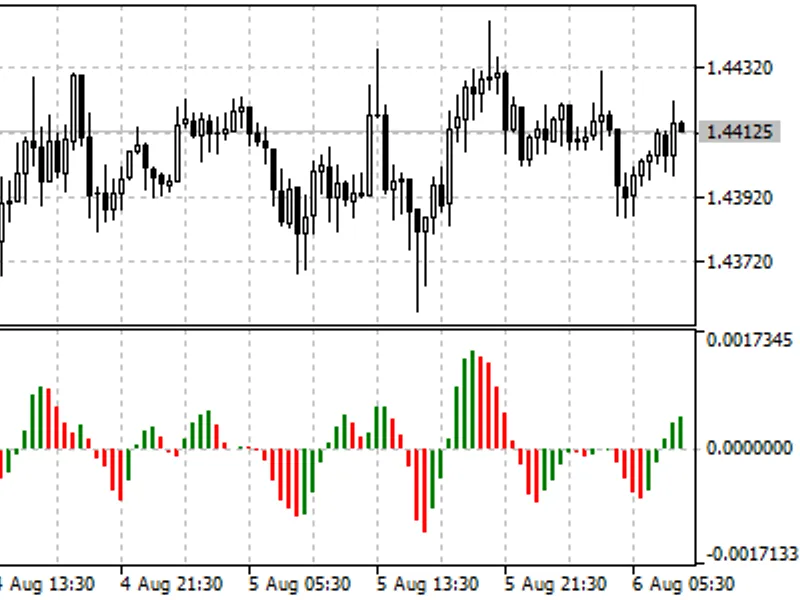
Acceleration/Deceleration technical indicator (AC) measures acceleration and deceleration of the current driving force. This indicator will change direction before any changes in the driving force, which will change its direction before the price. If you realize that Acceleration/Deceleration is a signal of an earlier warning, it gives you evident advantages.
The zero line is basically the spot where the driving force is at balance with the acceleration. If Acceleration/Deceleration is higher than zero, then it is usually easier for the acceleration to continue the upward movement (and vice versa in cases when it is below zero). Unlike in case with Awesome Oscillator, it is not regarded as a signal when the zero line is crossed. The only thing that needs to be done to control the market and make decisions is to watch for changes in color. Remember: Do not buy with the help of Acceleration/Deceleration, when the current column is colored red, and do not sell, when the current column is colored green.
If you enter the market in the direction of the driving force (the indicator is higher than zero, when buying, or it is lower than zero, when selling), then you need only two green columns to buy (two red columns to sell). If the driving force is directed against the position to be opened (indicator below zero for buying, or higher than zero for selling), a confirmation is needed, hence, an additional column is required. In this case the indicator is to show three red columns over the zero line for a short position and three green columns below the zero line for a long position.
Calculation:
AC bar chart is the difference between the value of 5/34 of the driving force bar chart and 5-period simple moving average, taken from that bar chart.
MEDIAN PRICE = (HIGH + LOW) / 2
AO = SMA (MEDIAN PRICE, 5) - SMA (MEDIAN PRICE, 34)
AC = AO - SMA (AO, 5)
where:
MEDIAN PRICE - median price;
HIGH - the highest price of the bar;
LOW - the lowest price of the bar;
SMA - Simple Moving Average;
AO - Awesome Oscillator.