The class for drawing the AD X using the ring buffer
This professional-grade solution for MetaTrader 5 helps traders achieve greater efficiency in their daily workflow. This technical indicator acts as a specialized analysis tool designed to visualize market data. It helps traders identify emerging trends, momentum shifts, and key support or resistance levels by plotting statistical calculations directly onto price charts.
How to Setup and Use The class for drawing the AD X using the ring buffer
1. Installation: Place your file in the MQL/Indicators folder via "Open Data Folder" and restart your terminal.
2. Loading: Find the indicator in the Navigator, drag it onto your chart, and configure the input parameters in the popup window.
3. Customization: Press Ctrl+I to open the indicator list, select your tool, and click "Properties" to change colors, levels, or visual styles.
4. Updating: Replace the old file in the Indicators folder with the new version and restart the platform to apply changes.
Frequently Asked Questions
Q: Why is my indicator not showing? A: Verify the file is in the MQL/Indicators folder, or try right-clicking the "Indicators" tree in the Navigator and clicking "Refresh."
Q: Do custom indicators slow down the platform? A: Too many complex indicators can impact performance; remove unused ones via the "Indicator List" (Ctrl+I).
Q: Can I use MT4 indicators on MT5? A: No, MQL4 and MQL5 are distinct languages; ensure the indicator is compiled specifically for your platform version.
Description & Settings
Description
The CADXOnRingBuffer class is designed for calculation of a technical indicator Average Directional Movement Index (, ADX) using the algorithm of .
Declaration
Title
File of the CADXOnRingBuffer.mqh class should be placed in the IncOnRingBuffer folder that need to be established in MQL5\Include\. Two files with the examples used by the class from this folder are attached to the description. File with the class of and the class of also must be in this folder.
Class methods
To get the calculated data of the indicator from the ring buffer is possible as from the usual array. For example:
Please note that indexing in the ring buffer is the same as in the .
Examples
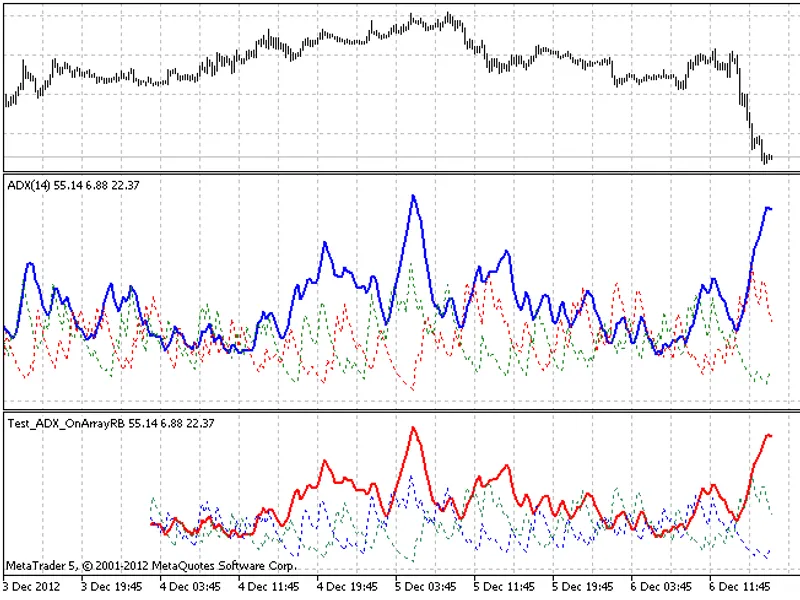
The Test_ADX_OnArrayRB.mq5 file calculates the indicator on the basis of the price time series. The MainOnArray() method application is demonstrated
The Test_ADX_OnValueRB.mq5 file demonstrates the use of the MainOnValue() method. At first the ADX indicator is calculated and drawn. Then on the basis of the ring buffer of this indicator, three lines of the ADX indicator are calculated.
The result of the work of the Test_ADX_OnArrayRB.mq5 with the size of the ring buffer of 256 elements
The result of the work of the Test_ADX_OnValueRB.mq5 with the size of the ring buffer of 256 elements
When writing code the developments of , and were used.