Breaker Block Detector MT4 - Smart Money IC T
This tool for MetaTrader 4 is specifically engineered to streamline your trading operations. This technical indicator acts as a specialized analysis tool designed to visualize market data. It helps traders identify emerging trends, momentum shifts, and key support or resistance levels by plotting statistical calculations directly onto price charts.
How to Setup and Use Breaker Block Detector MT4 - Smart Money IC T
1. Installation: Place your file in the MQL/Indicators folder via "Open Data Folder" and restart your terminal.
2. Loading: Find the indicator in the Navigator, drag it onto your chart, and configure the input parameters in the popup window.
3. Customization: Press Ctrl+I to open the indicator list, select your tool, and click "Properties" to change colors, levels, or visual styles.
4. Updating: Replace the old file in the Indicators folder with the new version and restart the platform to apply changes.
Frequently Asked Questions
Q: Why is my indicator not showing? A: Verify the file is in the MQL/Indicators folder, or try right-clicking the "Indicators" tree in the Navigator and clicking "Refresh."
Q: Do custom indicators slow down the platform? A: Too many complex indicators can impact performance; remove unused ones via the "Indicator List" (Ctrl+I).
Q: Can I use MT4 indicators on MT5? A: No, MQL4 and MQL5 are distinct languages; ensure the indicator is compiled specifically for your platform version.
Description & Settings
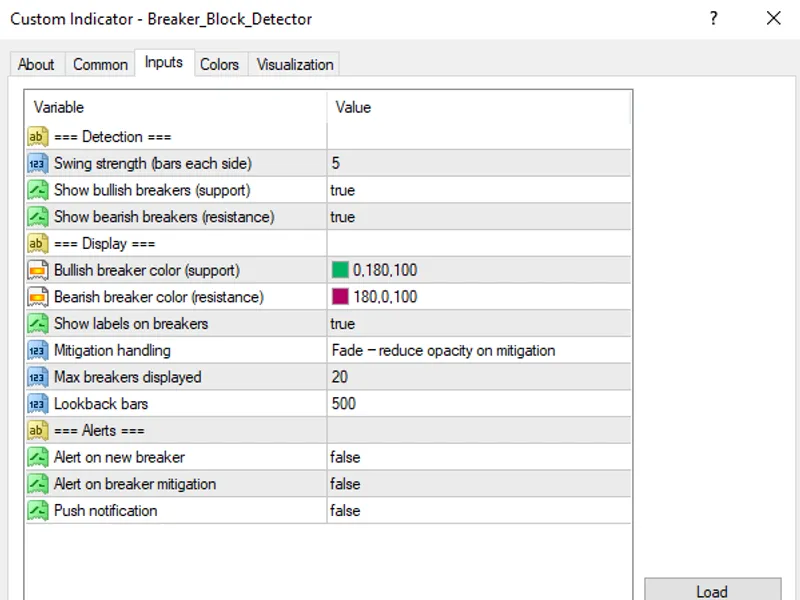
Identifies breaker blocks — when an order block gets broken by opposing price action, it flips polarity and becomes a high-probability zone from the opposite direction. A failed bullish OB becomes a bearish breaker block (resistance), and vice versa. Features: - Automatic order block detection as prerequisite - Tracks when OBs get broken (price closes through the zone) - Flips the broken OB into a breaker block with opposite color - Bullish breaker: former bearish OB broken upward — now support - Bearish breaker: former bullish OB broken downward — now resistance - Zone drawing with distinct visual style from regular OBs - Mitigation tracking: marks when price returns to test the breaker - Three modes for mitigated breakers: Remove, Fade, Keep - Configurable swing strength for underlying structure - Maximum breakers displayed - Alerts on new breaker formation and mitigation - Works on all timeframes Breaker blocks represent institutional position unwinding. When their OB fails, institutions flip direction — the breaker zone marks where they re-enter. Completes the SMC toolkit alongside BOS and Order Blocks.
You May Also Like
RobotFX does not own any of the code provided on this platform. All tools are freely available on the internet; we simply index and re-offer them for download. We are not responsible for any financial losses that may occur. Trading responsibilities rely solely on the traders downloading and using the displayed Expert Advisors, indicators, and scripts. These tools are provided for educational purposes only and may require modification or optimization to align with a trader's specific strategy or needs.
© ROBOTFX - Best MetaTrader Expert Advisors & Indicators